Spark Execution Plan Deep Dive: Reading EXPLAIN Like a Pro

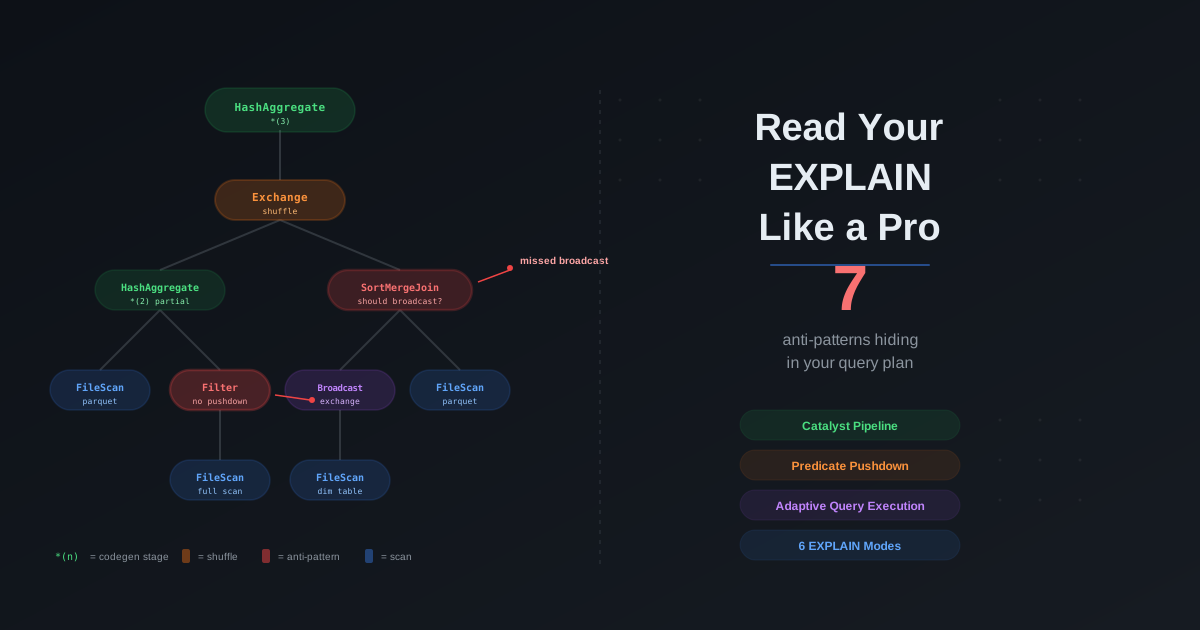
You open the Spark UI after a three-hour job finishes. The SQL tab shows a wall of operators — SortMergeJoin, Exchange hashpartitioning, *(3) HashAggregate, BroadcastExchange HashedRelationBroadcastMode. Your teammate asks why the optimizer did not broadcast the small dimension table. You stare at the plan. You recognize some words. You do not know how to read it.
Every Spark performance guide says "check the execution plan." Every tuning blog says "verify predicate pushdown in the EXPLAIN output." Every debugging guide says "look for unnecessary shuffles." None of them teach you how to actually read the plan from top to bottom — what every operator means, what the asterisk notation is, what the three different filter fields in a FileScan node represent, or how the plan you see before execution differs from the plan that actually runs.
This post is the missing manual. We start with how Spark transforms your code into an execution plan through the Catalyst optimizer pipeline, cover every EXPLAIN mode and when to use each one, walk through every physical plan operator you will encounter, explain whole-stage code generation and what the *(n) notation means, show how to verify predicate pushdown, cover how Adaptive Query Execution rewrites plans at runtime, map EXPLAIN output to the Spark UI, catalog the anti-patterns you can spot in any plan, and finish with a full annotated walkthrough of a real query.
The Catalyst Optimizer Pipeline
When you write a DataFrame transformation or a SQL query, Spark does not execute it immediately. The Catalyst optimizer transforms your code through six distinct stages before a single byte of data moves. Understanding this pipeline is the foundation for reading any execution plan — because explain("extended") shows you exactly these stages.
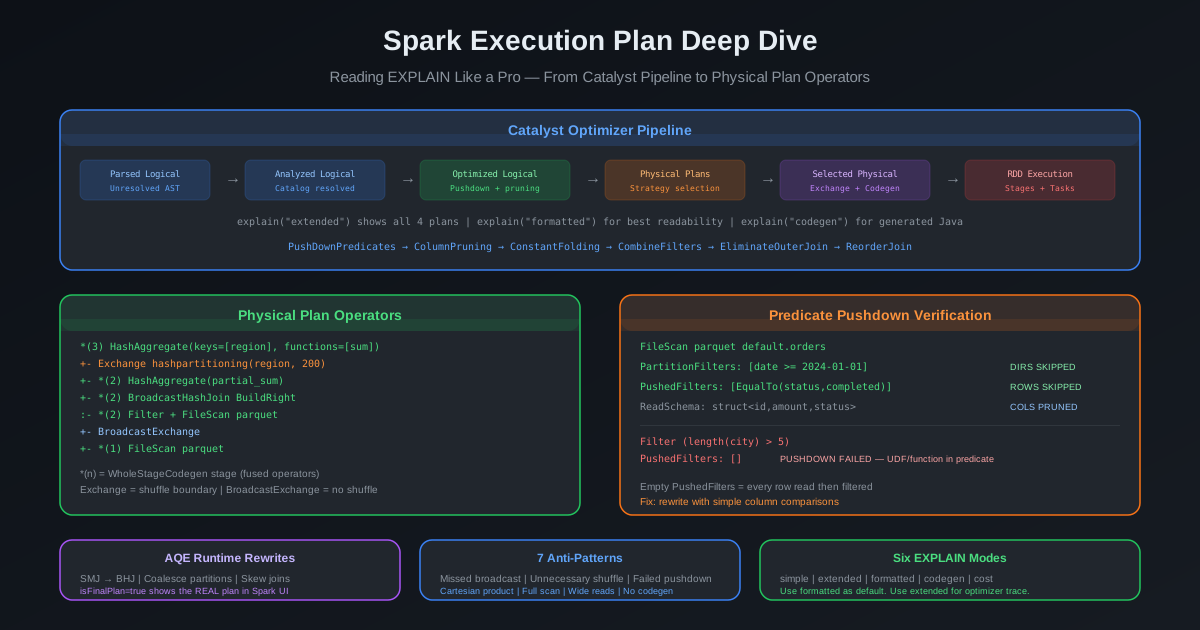
Stage 1: Parsed Logical Plan
Spark's SQL parser converts your code into an Abstract Syntax Tree. At this stage, nothing has been validated. Table names are strings. Column names are unresolved references. Function calls are just identifiers. If you write SELECT foo FROM bar WHERE baz > 10, the parser creates tree nodes for the select, the table reference, and the filter — but it has no idea whether bar is a real table or baz is a real column.
This is the Parsed Logical Plan shown in explain("extended").
Stage 2: Analyzed Logical Plan
The Analyzer resolves every reference against the SessionCatalog. It:
- Resolves table names to actual catalog entries
- Resolves column names to fully qualified attributes with data types
- Resolves function names to registered functions (built-in or user-defined)
- Validates data type compatibility
- Expands star (
*) into explicit column lists
If any reference cannot be resolved, Spark throws an AnalysisException at this stage — not at execution time. This is why df.select("nonexistent_column") fails immediately rather than when you call .collect().
Stage 3: Optimized Logical Plan
The Optimizer applies rule-based optimization in batches. Each batch contains rules that are applied iteratively until the plan stops changing (reaches a fixed point). Key rules include:
- PushDownPredicates — moves filter conditions closer to data sources
- ColumnPruning — removes columns not needed downstream
- ConstantFolding — evaluates constant expressions at compile time (
1 + 2becomes3) - CombineFilters — merges adjacent filter nodes into a single node
- CollapseProject — merges adjacent select/project nodes
- BooleanSimplification — simplifies boolean logic (
x AND truebecomesx) - EliminateOuterJoin — converts outer joins to inner joins when null rows are filtered out downstream
- ReorderJoin — reorders multi-table joins for optimal execution (with CBO enabled)
- LimitPushDown — pushes LIMIT closer to data sources
- OptimizeIn — converts large IN lists to hash-based InSet for performance
The Optimized Logical Plan is what you see after these rules have been applied. Comparing it with the Analyzed Logical Plan shows you exactly what the optimizer did.
Stage 4: Physical Plan Generation
The SparkPlanner converts the optimized logical plan into one or more candidate physical plans. This is where logical operations become concrete execution strategies:
- JoinSelection picks a physical join strategy (BroadcastHashJoin, SortMergeJoin, ShuffledHashJoin, BroadcastNestedLoopJoin, CartesianProduct)
- Aggregation picks an aggregation strategy (HashAggregate, SortAggregate, ObjectHashAggregate)
- FileSourceStrategy plans file-based scans with partition pruning and predicate pushdown
- BasicOperators maps logical operators to their physical counterparts
Stage 5: Selected Physical Plan
Spark selects the best physical plan using a cost model, then applies physical preparation rules:
- EnsureRequirements — inserts
Exchange(shuffle) andSortnodes wherever the data distribution or ordering does not match what an operator needs - CollapseCodegenStages — groups codegen-compatible operators into
WholeStageCodegenblocks (the*(n)stages you see in plans) - ReuseExchange — identifies identical Exchange nodes and eliminates duplicates
- PlanSubqueries — plans subquery execution
This is the Physical Plan you see in EXPLAIN output — the final blueprint for execution.
Stage 6: RDD Execution
The physical plan generates RDD code — or, with whole-stage code generation, compiled Java bytecode. The DAGScheduler breaks it into stages at shuffle boundaries (Exchange nodes). The TaskScheduler distributes tasks to executors. Data moves.
DataFrame / SQL query
        │
        ▼
┌────────────────────┐
│  Parsed Logical     │  Unresolved AST — names are just strings
│  Plan               │
└─────────┬──────────┘
          ▼
┌────────────────────┐
│  Analyzed Logical   │  Catalog resolution — types, schemas validated
│  Plan               │
└─────────┬──────────┘
          ▼
┌────────────────────┐
│  Optimized Logical  │  Rule-based optimization — pushdown, pruning,
│  Plan               │  folding, join reorder
└─────────┬──────────┘
          ▼
┌────────────────────┐
│  Physical Plans     │  SparkPlanner generates candidates
│  (candidates)       │  (JoinSelection, Aggregation, FileSourceStrategy)
└─────────┬──────────┘
          ▼
┌────────────────────┐
│  Selected Physical  │  Cost model picks winner. EnsureRequirements
│  Plan               │  adds Exchange + Sort. CollapseCodegenStages
│                     │  fuses operators into WholeStageCodegen blocks
└─────────┬──────────┘
          ▼
┌────────────────────┐
│  RDD Execution      │  DAGScheduler → stages → TaskScheduler →
│                     │  executors → data movement
└────────────────────┘
The Six EXPLAIN Modes
Spark provides six ways to inspect execution plans. Each serves a different debugging purpose.
Simple — Quick Strategy Check
df.explain()
# or
df.explain("simple")
EXPLAIN SELECT * FROM orders WHERE amount > 100;
Shows only the physical plan. This is the fastest way to check which join strategy was selected, whether shuffles exist, and whether predicates were pushed down. Use this for quick spot checks.
Extended — Full Optimizer Trace
df.explain("extended")
# or
df.explain(True)
EXPLAIN EXTENDED SELECT * FROM orders WHERE amount > 100;
Shows all four plans: Parsed Logical Plan, Analyzed Logical Plan, Optimized Logical Plan, and Physical Plan. Use this when you need to understand what the optimizer did — which rules fired, whether predicates moved, whether columns were pruned, or why a particular strategy was chosen.
Example output structure:
== Parsed Logical Plan ==
'Filter ('amount > 100)
+- 'UnresolvedRelation [orders]

== Analyzed Logical Plan ==
order_id: bigint, customer_id: bigint, amount: double, order_date: date
Filter (amount#5 > cast(100 as double))
+- SubqueryAlias spark_catalog.default.orders
   +- Relation default.orders[order_id#3L,customer_id#4L,amount#5,...] parquet

== Optimized Logical Plan ==
Filter (isnotnull(amount#5) AND (amount#5 > 100.0))
+- Relation default.orders[order_id#3L,customer_id#4L,amount#5,...] parquet

== Physical Plan ==
*(1) Filter (isnotnull(amount#5) AND (amount#5 > 100.0))
+- *(1) ColumnarToRow
   +- FileScan parquet default.orders[order_id#3L,customer_id#4L,amount#5,...]
         Batched: true, DataFilters: [isnotnull(amount#5), (amount#5 > 100.0)],
         Format: Parquet, Location: InMemoryFileIndex[...],
         PartitionFilters: [], PushedFilters: [IsNotNull(amount), GreaterThan(amount,100.0)],
         ReadSchema: struct<order_id:bigint,customer_id:bigint,amount:double,...>
Notice: the Parsed plan has unresolved references ('amount). The Analyzed plan resolves them with types (amount#5). The Optimized plan adds isnotnull (necessary for predicate pushdown). The Physical plan shows the actual scan with pushed filters.
Formatted — Most Readable
df.explain("formatted")
EXPLAIN FORMATTED SELECT * FROM orders WHERE amount > 100;
Splits the output into two sections: a numbered hierarchical tree and a detail section for each numbered node. This is the most readable mode for complex plans with many operators. Introduced in Spark 3.0.
== Physical Plan ==
* Filter (1)
+- * ColumnarToRow (2)
   +- Scan parquet default.orders (3)

(1) Filter [codegen id : 1]
Output [4]: [order_id#3L, customer_id#4L, amount#5, order_date#6]
Input [4]: [order_id#3L, customer_id#4L, amount#5, order_date#6]
Condition : (isnotnull(amount#5) AND (amount#5 > 100.0))

(2) ColumnarToRow [codegen id : 1]
Input [4]: [order_id#3L, customer_id#4L, amount#5, order_date#6]

(3) Scan parquet default.orders
Output [4]: [order_id#3L, customer_id#4L, amount#5, order_date#6]
Batched: true
Location: InMemoryFileIndex [...]
PushedFilters: [IsNotNull(amount), GreaterThan(amount,100.0)]
ReadSchema: struct<order_id:bigint,customer_id:bigint,amount:double,order_date:date>
Recommendation: Use formatted as your default mode for any plan with more than a handful of operators. The numbered nodes and separated detail sections make it far easier to trace data flow in complex plans.
Codegen — Generated Java Source
df.explain("codegen")
EXPLAIN CODEGEN SELECT * FROM orders WHERE amount > 100;
Shows the physical plan plus the generated Java source code for each whole-stage codegen stage. The output includes methods like processNext() containing the fused operator loop. Use this when debugging codegen issues — verifying that operators are being fused, understanding why a stage is slow, or troubleshooting compilation failures.
Cost — Statistics Verification
df.explain("cost")
EXPLAIN COST SELECT * FROM orders WHERE amount > 100;
Shows the optimized logical plan annotated with node statistics — sizeInBytes, rowCount, and any histogram data when available. Use this after running ANALYZE TABLE to verify that the cost-based optimizer has accurate statistics.
Example statistics annotation:
== Optimized Logical Plan ==
Filter (isnotnull(amount#5) AND (amount#5 > 100.0)), Statistics(sizeInBytes=5.0 GiB, rowCount=1.25E8)
+- Relation default.orders[...] parquet, Statistics(sizeInBytes=8.0 GiB, rowCount=2.50E8)
If sizeInBytes shows the default estimate rather than real statistics, your ANALYZE TABLE either did not run or is stale.
Summary: When to Use Each Mode
| Mode | Shows | Best For |
|---|---|---|
simple | Physical plan only | Quick join strategy check, shuffle count |
extended | All 4 plan stages | Understanding optimizer decisions |
formatted | Numbered tree + details | Reading complex plans (recommended default) |
codegen | Physical plan + Java source | Debugging codegen fusion issues |
cost | Optimized plan + statistics | Verifying CBO accuracy after ANALYZE TABLE |
Reading the Physical Plan — Bottom to Top
The physical plan is a tree. Data flows from the leaves (bottom) to the root (top). When you read a plan, start at the bottom — the scan nodes — and follow the data upward through filters, joins, aggregations, and projections.
Every indentation level and tree connector (+-, :-) represents a parent-child relationship. The child produces data that flows into the parent.
Scan Nodes — Where Data Enters the Plan
Scan nodes are always at the leaves of the plan tree. They represent data being read from storage. The most common is FileScan parquet, but you will also see FileScan orc, FileScan csv, InMemoryTableScan (cached data), and DataSourceV2Scan (Iceberg, Delta, JDBC).
A FileScan node contains critical metadata:
FileScan parquet default.sales[city#6,revenue#7,date#8]
  Batched: true
  DataFilters: [isnotnull(city#6), (city#6 = Seattle)]
  Format: Parquet
  Location: InMemoryFileIndex[s3://warehouse/sales]
  PartitionFilters: [isnotnull(date#8), (date#8 >= 2024-01-01)]
  PushedFilters: [IsNotNull(city), EqualTo(city,Seattle)]
  ReadSchema: struct<city:string,revenue:double>
Every field matters:
Batched: true — Vectorized columnar reading is enabled. Spark reads Parquet data in columnar batches rather than row-by-row. This is critical for performance and is the default for Parquet. If you see false, check spark.sql.parquet.enableVectorizedReader.
ReadSchema — The columns Spark will actually read from disk. This is the result of column pruning. If your query uses 3 columns from a 50-column table, only those 3 appear here. If you see all 50 columns, something is forcing a full schema read (often a SELECT * upstream or a UDF that references the whole row).
PartitionFilters — Filters on partition columns. These are applied during partition discovery, before any data files are opened. Entire directories of data are skipped. This is the cheapest possible filter — the data is never read at all. If your table is partitioned by date and your WHERE clause includes date >= '2024-01-01', this filter should appear here.
PushedFilters — Filters pushed to the file reader (Parquet or ORC). The reader uses column statistics (min/max values stored in row group footers) and bloom filters to skip entire row groups without decompressing them. These use a different syntax — IsNotNull(city) instead of isnotnull(city#6) — because they are data source filter objects, not Catalyst expressions.
DataFilters — Column-level filters that are evaluated during data reading. This is the superset: all non-partition filters. Some DataFilters become PushedFilters (when the data source supports the predicate). Others remain as post-scan Filter nodes.
The relationship between these three:
All filters in WHERE clause
├── PartitionFilters   → Applied during partition discovery (directories skipped)
└── DataFilters        → Applied during data reading
    ├── PushedFilters  → Pushed to file reader (row groups skipped)
    └── Remaining      → Post-scan Filter node (rows read then discarded)
Exchange Nodes — Where Shuffles Happen
Exchange nodes represent data redistribution across the cluster — the shuffle. Every Exchange is a stage boundary. Every Exchange means data is serialized, written to local disk, transferred over the network, and deserialized on destination executors. Minimizing Exchange nodes is one of the most effective optimizations you can make.
ShuffleExchange is displayed as Exchange followed by the partitioning strategy:
Exchange hashpartitioning(customer_id#4L, 200), ENSURE_REQUIREMENTS, [plan_id=50]
This tells you: data is being shuffled by customer_id into 200 partitions. The ENSURE_REQUIREMENTS tag means this shuffle was inserted by the EnsureRequirements physical preparation rule because the downstream operator (typically a join or aggregation) requires a specific data distribution.
The four partitioning types:
| Partitioning | Syntax in Plan | When Created | Purpose |
|---|---|---|---|
| Hash | hashpartitioning(col, 200) | Joins, groupBy, repartition(n, col) | Co-locates rows with the same key on the same executor |
| Range | rangepartitioning(col ASC, 200) | ORDER BY, repartitionByRange() | Creates globally sorted partitions |
| Round-robin | roundrobinpartitioning(200) | repartition(200) without columns | Even distribution for load balancing |
| Single | SinglePartition | coalesce(1), global aggregations | All data to one partition |
BroadcastExchange is a different kind of data movement. Instead of shuffling, the small table is sent to every executor:
BroadcastExchange HashedRelationBroadcastMode(List(input[0, bigint, false]),false), [plan_id=45]
BroadcastExchange does not create a stage boundary the same way ShuffleExchange does. It runs as a separate broadcast job and the result is available to all tasks in the parent stage.
Key insight: count your Exchange nodes. Each ShuffleExchange is a full network shuffle. A plan with 6 Exchange nodes means 6 shuffles. If you expected 2, investigate why the other 4 exist.
Sort Nodes
Sort nodes appear as:
Sort [customer_id#4L ASC NULLS FIRST], false, 0
The boolean (false here) indicates whether this is a global sort (true) or a local per-partition sort (false). Most sorts in execution plans are local — they appear before SortMergeJoin or within a RangePartitioning. A global sort produces a single sorted output across all partitions.
Sorts are expensive — they require memory for the sort buffer, and spill to disk when memory is exhausted. In SortMergeJoin plans, you will always see two Sort nodes (one per side) between the Exchange and the join operator.
Join Operators
Five physical join strategies appear in plans, each with a distinct signature:
BroadcastHashJoin:
*(2) BroadcastHashJoin [customer_id#4L], [customer_id#21L], Inner, BuildRight, false
:- *(2) Filter ...
:  +- *(2) ColumnarToRow
:     +- FileScan parquet default.orders [...]
+- BroadcastExchange HashedRelationBroadcastMode(...)
   +- *(1) Filter ...
      +- *(1) ColumnarToRow
         +- FileScan parquet default.customers [...]
Identifiers: BroadcastHashJoin with BuildRight or BuildLeft (indicating which side is broadcast), and a BroadcastExchange below the build side instead of a ShuffleExchange. No Exchange on the probe (large) side.
SortMergeJoin:
*(5) SortMergeJoin [order_id#10L], [order_id#31L], Inner
:- *(2) Sort [order_id#10L ASC NULLS FIRST], false, 0
:  +- Exchange hashpartitioning(order_id#10L, 200), ENSURE_REQUIREMENTS
:     +- *(1) Filter ...
:        +- *(1) ColumnarToRow
:           +- FileScan parquet default.orders [...]
+- *(4) Sort [order_id#31L ASC NULLS FIRST], false, 0
   +- Exchange hashpartitioning(order_id#31L, 200), ENSURE_REQUIREMENTS
      +- *(3) Filter ...
         +- *(3) ColumnarToRow
            +- FileScan parquet default.transactions [...]
Identifiers: SortMergeJoin with two child branches, each containing Exchange hashpartitioning and Sort. This is the most expensive join pattern — two full shuffles plus two sorts.
ShuffledHashJoin:
*(3) ShuffledHashJoin [id#0L], [id#1L], Inner, BuildRight
:- Exchange hashpartitioning(id#0L, 200)
:  +- *(1) ...
+- Exchange hashpartitioning(id#1L, 200)
   +- *(2) ...
Identifiers: ShuffledHashJoin with BuildRight/BuildLeft, two Exchange nodes but no Sort nodes. Cheaper than SMJ when sort is the bottleneck.
BroadcastNestedLoopJoin:
BroadcastNestedLoopJoin BuildRight, Inner, (price#5 > min_price#15)
+- FileScan parquet default.products [...]
+- BroadcastExchange IdentityBroadcastMode
   +- FileScan parquet default.thresholds [...]
Identifiers: BroadcastNestedLoopJoin with a non-equality join condition. O(N * M) complexity. If you see this with large tables, your query has a missing or non-equi join condition.
CartesianProduct:
CartesianProduct
:- FileScan parquet default.table_a [...]
+- FileScan parquet default.table_b [...]
Identifiers: CartesianProduct — every row from one side combined with every row from the other. If this is not a deliberate cross join, you have a missing join condition.
Aggregation Operators
Aggregations in Spark use a two-phase approach: partial aggregation before the shuffle (map-side combine) and final aggregation after the shuffle.
*(3) HashAggregate(keys=[city#6], functions=[sum(revenue#7), count(1)])
+- Exchange hashpartitioning(city#6, 200), ENSURE_REQUIREMENTS
   +- *(1) HashAggregate(keys=[city#6], functions=[partial_sum(revenue#7), partial_count(1)])
      +- *(1) ColumnarToRow
         +- FileScan parquet default.sales [city#6,revenue#7]
The bottom HashAggregate runs partial_sum and partial_count — these are pre-shuffle partial aggregates that reduce the data volume before shuffling. After the Exchange, the top HashAggregate runs the final sum and count, merging partial results.
Three aggregation strategies:
| Operator | When Chosen | Memory Model |
|---|---|---|
| HashAggregate | All aggregate buffers use fixed-size types (Boolean, Int, Long, Float, Double, Date, Timestamp) | Off-heap via UnsafeFixedWidthAggregationMap. Falls back to sort-based under memory pressure |
| ObjectHashAggregate | Buffer includes variable-size or complex types (e.g., collect_list, collect_set, complex UDFs) | On-heap Java objects. Falls back to sort-based when distinct key count exceeds spark.sql.objectHashAggregate.sortBased.fallbackThreshold (default 128) |
| SortAggregate | Fallback when hash-based aggregation is not feasible or under memory pressure | Requires pre-sorted input by group keys. Handles arbitrary data sizes but slower |
HashAggregate is the fastest. If you see SortAggregate in a plan where you expected HashAggregate, check whether your aggregate functions use non-fixed-size types.
Filter and Project Nodes
Filter applies predicate conditions. Project performs column selection and expression evaluation. In most plans, these are fused into their neighboring operators via whole-stage code generation — you will see them inside a *(n) block alongside the scan or join they belong to.
When a Filter appears as a standalone node above a FileScan, check the PushedFilters field in the scan. If the filter predicate is not in PushedFilters, it means the pushdown failed and Spark is evaluating the predicate row-by-row after reading.
Whole-Stage Code Generation — What the Asterisk Means
The *(n) prefix is one of the most important and least understood notations in Spark plans. It represents a WholeStageCodegen stage — a group of operators that have been fused into a single generated Java function.
The Problem Codegen Solves
Without codegen, Spark evaluates the plan using the Volcano iterator model: each operator has a next() method that pulls one row from its child, processes it, and returns it to the parent. For a plan with Filter → Project → HashAggregate, every single row passes through three virtual function calls. Virtual dispatch, boxing, and memory allocation for intermediate rows create significant overhead — often more than the actual computation.
Whole-stage code generation eliminates this overhead. It compiles all operators in a stage into a single Java function that processes rows in a tight loop — no virtual calls, no intermediate row allocations, direct field access via CPU registers.
Reading the Notation
*(2) HashAggregate(keys=[city#6], functions=[sum(revenue#7)])
+- Exchange hashpartitioning(city#6, 200)
   +- *(1) HashAggregate(keys=[city#6], functions=[partial_sum(revenue#7)])
      +- *(1) Filter isnotnull(city#6)
         +- *(1) ColumnarToRow
            +- FileScan parquet default.sales [city#6,revenue#7]
*(1) — Codegen stage 1. The FileScan, ColumnarToRow, Filter, and partial HashAggregate are all fused into a single generated Java function. Data flows from scan through filter through partial aggregation without leaving the generated method.
Exchange — The shuffle. This breaks the codegen chain because data must be serialized, sent over the network, and deserialized. You cannot fuse operators across a network boundary.
*(2) — Codegen stage 2. The final HashAggregate runs in a separate generated function on the post-shuffle data.
The number in parentheses is just a sequential ID — it does not indicate execution order or priority. It simply identifies which codegen stage an operator belongs to.
Operators That Support Codegen
These operators implement the CodegenSupport trait and can be fused into WholeStageCodegen stages:
- Scan: FileScanExec (Parquet, ORC), InMemoryTableScanExec, DataSourceV2ScanExec
- Row conversion: ColumnarToRowExec
- Filter and project: FilterExec, ProjectExec
- Aggregation: HashAggregateExec (without ImperativeAggregate functions)
- Joins: BroadcastHashJoinExec, SortMergeJoinExec
- Other: RangeExec, LocalTableScanExec, GenerateExec (explode, inline), SampleExec, ExpandExec, SerializeFromObjectExec, DeserializeToObjectExec
What Breaks Codegen
Certain conditions cause codegen to be disabled for a stage or for the entire plan:
Exchange and BroadcastExchange — Always break codegen chains. They are stage boundaries where data is serialized for network transfer.
Too many fields — If the input or output schema of a codegen stage exceeds spark.sql.codegen.maxFields (default 200), codegen is disabled for that stage. Wide tables with hundreds of columns hit this limit. The operator runs without the *(n) prefix.
Generated code too large — If the generated bytecode exceeds spark.sql.codegen.hugeMethodLimit (default 65535 bytes, the JVM method size limit), Spark logs an INFO message: "Found too long generated codes and JIT optimization might not work". The JVM's JIT compiler cannot optimize methods beyond this size, causing a significant performance cliff.
Compilation failure — If the generated code fails to compile and spark.sql.codegen.fallback=true (default), Spark falls back to interpreted execution silently. Check executor logs for WARN messages about codegen compilation failures.
ImperativeAggregate functions — Aggregate functions with imperative (non-declarative) implementations disable codegen for the aggregate. Some complex UDAFs fall into this category.
Codegen Configuration Reference
| Config | Default | Effect |
|---|---|---|
spark.sql.codegen.wholeStage | true | Master switch for whole-stage codegen |
spark.sql.codegen.maxFields | 200 | Codegen disabled when schema exceeds this width |
spark.sql.codegen.hugeMethodLimit | 65535 | Max generated method bytecode size (JVM limit) |
spark.sql.codegen.fallback | true | Fall back to interpreted execution on compilation failure |
spark.sql.codegen.comments | false | Add comments to generated code (useful with explain("codegen")) |
When Missing Asterisks Are a Problem
If you see operators without the *(n) prefix that should have it — for example, a HashAggregate or Filter running outside a codegen stage — check:
- Schema width — count the columns in
ReadSchema. If you are near 200, column pruning might fix it - Codegen disabled — verify
spark.sql.codegen.wholeStageistrue - Compilation errors — check executor logs for codegen WARN messages
- UDF usage — Python UDFs and some complex Scala UDFs break codegen
Predicate Pushdown — Verify or Suspect
Predicate pushdown is the single most important optimization for scan-heavy workloads. When a predicate is pushed down, the data source (Parquet reader, ORC reader, JDBC source) evaluates the filter at the storage layer — skipping entire row groups, stripes, or pages without reading them into memory. When pushdown fails, every row is read and then filtered in Spark's execution engine.
The Three Filter Levels
Every filter in your WHERE clause is classified into one of three levels. Understanding the difference is the key to verifying pushdown.
Level 1: PartitionFilters — Filters on partition columns. Applied during partition discovery, before any data files are opened. If your table is partitioned by date and your query filters on date >= '2024-01-01', the partitions for dates before 2024 are never touched. No files are listed, no bytes are read. This is the cheapest possible filter.
PartitionFilters: [isnotnull(date#8), (date#8 >= 2024-01-01)]
Level 2: PushedFilters — Filters pushed to the file reader for row group or stripe skipping. The Parquet reader checks column statistics (min/max values in each row group footer) and bloom filters against these predicates. If a row group's max value for amount is 50 and the filter is amount > 100, the entire row group is skipped without decompression.
PushedFilters: [IsNotNull(amount), GreaterThan(amount,100.0)]
Note the different syntax: GreaterThan(amount,100.0) instead of (amount#5 > 100.0). PushedFilters are data source filter objects, not Catalyst expressions.
Level 3: DataFilters / Post-scan Filter — All remaining column-level filters that could not be pushed down, or that Spark evaluates as a safety net even when pushdown succeeded. These filters read the data first, then discard non-matching rows.
Successful Pushdown
*(1) Filter (isnotnull(amount#5) AND (amount#5 > 100.0))
+- *(1) ColumnarToRow
   +- FileScan parquet default.orders [order_id#3L,amount#5]
         Batched: true,
         DataFilters: [isnotnull(amount#5), (amount#5 > 100.0)],
         PushedFilters: [IsNotNull(amount), GreaterThan(amount,100.0)],
         ReadSchema: struct<order_id:bigint,amount:double>
PushedFilters is non-empty. Both predicates were pushed to the Parquet reader. The Filter node above the scan is a redundant safety check — it will process fewer rows because the reader already skipped non-matching row groups.
Failed Pushdown
*(1) Filter (length(city#6) > 5)
+- *(1) ColumnarToRow
   +- FileScan parquet default.sales [city#6,revenue#7]
         Batched: true,
         DataFilters: [length(city#6) > 5],
         PushedFilters: [],
         ReadSchema: struct<city:string,revenue:double>
PushedFilters is empty. The length() function cannot be evaluated by the Parquet reader — it requires decompressing and reading the string value first. Every row group is read. Every row is decompressed. Then the filter is applied. For a 100 GB table where only 1% matches, you just read 99 GB of unnecessary data.
Common Pushdown Killers
These predicates cannot be pushed down to Parquet or ORC:
- UDFs —
WHERE my_udf(column) = value - Complex expressions —
WHERE length(city) > 5,WHERE substring(name, 1, 3) = 'ABC' - CAST on the column side —
WHERE CAST(string_col AS INT) > 100 - Non-deterministic functions —
WHERE rand() > 0.5 - Predicates on derived columns —
WHERE a + b > 100 - LIKE with leading wildcard —
WHERE name LIKE '%smith'(but'smith%'can be pushed) - OR with non-pushable conditions —
WHERE pushable_pred OR non_pushable_pred(entire OR fails)
The Fix Pattern
When you find a failed pushdown, restructure the predicate to use simple column comparisons:
# Before — pushdown fails
df.filter(F.length(F.col("city")) > 5)

# After — pushdown succeeds (if you know the specific values)
df.filter(F.col("city").isin(["Seattle", "Portland", "San Francisco"]))

# Or: pre-compute into a column and filter on that
df.withColumn("city_length", F.length(F.col("city"))) \
  .filter(F.col("city_length") > 5)
# Note: city_length filter still won't push down, but this isolates
# the problem and keeps other predicates pushable
Verification Checklist
- Run
df.explain("formatted")ordf.explain() - Find the
FileScannode - Check
PartitionFilters— are your partition column filters present? - Check
PushedFilters— are your data column filters present? - Check
ReadSchema— does it contain only the columns you need? - If PushedFilters is empty for a predicate, check whether the predicate uses UDFs, functions, or complex expressions
Adaptive Query Execution — Plans That Rewrite at Runtime
Adaptive Query Execution (AQE) fundamentally changes how you read execution plans. With AQE enabled (default since Spark 3.2), the plan you see from explain() before execution is not the plan that actually runs. AQE collects runtime statistics after each shuffle stage completes and uses them to rewrite the remaining plan.
AdaptiveSparkPlan — The AQE Root Node
When AQE is active, the plan root is AdaptiveSparkPlan with an isFinalPlan flag:
== Physical Plan ==
AdaptiveSparkPlan isFinalPlan=false
+- ...
isFinalPlan=false — The plan has not executed yet. This is what you see from explain() before calling an action. It shows the compile-time plan, which may change significantly at runtime.
isFinalPlan=true — The plan has finished executing. This is what you see in the Spark UI SQL tab or after the job completes. It shows the actual plan that ran, with all AQE optimizations applied.
Critical insight: To see the real plan, check the Spark UI SQL tab after the job completes, not the explain() output before execution.
Optimization 1: Dynamically Coalescing Post-Shuffle Partitions
After a shuffle completes, AQE examines actual partition sizes. If spark.sql.shuffle.partitions is set to 200 but the data only fills 15 partitions meaningfully, AQE coalesces the 185 near-empty partitions into a smaller number.
Plan indicator:
+- AQEShuffleRead coalesced
   +- ShuffleQueryStage 0
      +- Exchange hashpartitioning(city#6, 200)
AQEShuffleRead coalesced means AQE merged small partitions after the shuffle. In older Spark 3.0/3.1 versions, this appears as CustomShuffleReader instead of AQEShuffleRead.
Key configs:
| Config | Default | Effect |
|---|---|---|
spark.sql.adaptive.coalescePartitions.enabled | true | Enable partition coalescing |
spark.sql.adaptive.advisoryPartitionSizeInBytes | 64MB | Target partition size after coalescing |
spark.sql.adaptive.coalescePartitions.minPartitionSize | 1MB | Minimum partition size (avoids too-small partitions) |
Optimization 2: Dynamically Switching Join Strategies
This is AQE's most impactful optimization. At compile time, the optimizer might choose SortMergeJoin because it estimated a table at 500 MB (above the 10 MB broadcast threshold). After the shuffle map stage runs, AQE knows the actual data size. If it turns out to be 8 MB, AQE converts the SortMergeJoin to a BroadcastHashJoin — eliminating the sort phase and one shuffle.
Before execution (compile-time plan):
AdaptiveSparkPlan isFinalPlan=false
+- SortMergeJoin [id#0L], [id#1L], Inner
   :- Sort [id#0L ASC NULLS FIRST], false, 0
   :  +- Exchange hashpartitioning(id#0L, 200)
   :     +- FileScan parquet default.large_table [id#0L, name#1]
   +- Sort [id#1L ASC NULLS FIRST], false, 0
      +- Exchange hashpartitioning(id#1L, 200)
         +- FileScan parquet default.small_table [id#1L, amount#2]
After execution (runtime-optimized plan):
AdaptiveSparkPlan isFinalPlan=true
+- BroadcastHashJoin [id#0L], [id#1L], Inner, BuildRight
   :- AQEShuffleRead coalesced
   :  +- ShuffleQueryStage 0
   :     +- Exchange hashpartitioning(id#0L, 200)
   :        +- FileScan parquet default.large_table [id#0L, name#1]
   +- BroadcastQueryStage 1
      +- BroadcastExchange HashedRelationBroadcastMode(List(input[0, bigint, false]))
         +- ShuffleQueryStage 2
            +- Exchange hashpartitioning(id#1L, 200)
               +- FileScan parquet default.small_table [id#1L, amount#2]
Notice: SortMergeJoin became BroadcastHashJoin. The Sort nodes disappeared. ShuffleQueryStage and BroadcastQueryStage are AQE stage boundaries that allow runtime re-optimization between stages.
Optimization 3: Dynamically Handling Skew Joins
AQE detects skewed partitions in SortMergeJoin by comparing each partition's size against the median. When a partition is larger than skewedPartitionFactor * median AND larger than skewedPartitionThresholdInBytes, AQE splits it into smaller sub-partitions and replicates the matching partition from the other side.
Plan indicator:
SortMergeJoin [id#0L], [id#1L], Inner, isSkew=true
The isSkew=true flag indicates AQE detected and handled skew in this join.
Key configs:
| Config | Default | Effect |
|---|---|---|
spark.sql.adaptive.skewJoin.enabled | true | Enable skew join optimization |
spark.sql.adaptive.skewJoin.skewedPartitionFactor | 5.0 | Partition is skewed if size > factor * median |
spark.sql.adaptive.skewJoin.skewedPartitionThresholdInBytes | 256MB | Minimum absolute size for skew detection |
Reading AQE Plans — Summary
When AQE is enabled, follow this process:
- Run
explain()before execution to see the compile-time plan — useful for understanding the initial strategy - Execute the action (
.collect(),.write(),.count()) - Check the Spark UI SQL tab for the
isFinalPlan=trueplan — this is what actually ran - Look for
AQEShuffleRead coalesced(partition coalescing),BroadcastQueryStage(join strategy switch), andisSkew=true(skew handling)
Mapping EXPLAIN Output to the Spark UI
The Spark UI's SQL tab visualizes the same plan you see in EXPLAIN output, but with runtime metrics. Knowing how to correlate the two gives you the full picture — the static plan structure from EXPLAIN plus the actual row counts, data sizes, and timing from the UI.
SQL Tab — The Graphical Plan
Click on a query in the SQL tab to see its physical plan as a directed acyclic graph (DAG). Each box in the graph corresponds to an operator in the EXPLAIN output. Edges show data flow.
The graphical plan includes runtime metrics that EXPLAIN output cannot provide:
- number of output rows — how many rows each operator produced
- data size — actual bytes processed
- time in each operator — wall clock time
- spill size — data spilled to disk
Click "Details" at the bottom of the SQL query page to see the full text plans — Parsed, Analyzed, Optimized, and Physical — the same output as explain("extended").
Exchange Nodes = Stage Boundaries
Every Exchange (ShuffleExchange) in the EXPLAIN output creates a stage boundary in the Spark UI. Count the Exchange nodes in your plan to predict how many stages you will see.
*(5) SortMergeJoin                          ─┐
:- *(2) Sort                                 │  Stage 3
:  +- Exchange hashpartitioning(...)   ─ ─ ─ ┘ ← boundary
:     +- *(1) Filter                    ─┐
:        +- *(1) FileScan                │  Stage 1
:                                       ─┘
+- *(4) Sort                            ─┐
   +- Exchange hashpartitioning(...)─ ─ ─┘  Stage 4  ← boundary
      +- *(3) Filter                 ─┐
         +- *(3) FileScan             │  Stage 2
                                    ─┘
This plan has 2 Exchange nodes, creating 4 stages (2 scan stages and 2 post-shuffle stages that feed into the join).
Task Counts and Partition Sizes
Each task in the Spark UI corresponds to one partition at that stage. In the Tasks tab:
- Shuffle Write Size for a task shows how much data that task wrote to its Exchange
- Shuffle Read Size shows how much data a post-shuffle task received
- Duration spread reveals skew — if the median task takes 5 seconds and the max takes 5 minutes, you have a skewed partition
WholeStageCodegen and the DAG
The *(n) codegen stages in EXPLAIN map to operators within a single stage in the DAG. Multiple *(n) stages in the same execution stage (between two Exchange boundaries) are separate codegen stages that run sequentially within the same task.
Seven Anti-Patterns to Spot in Any Plan
These are the patterns that cause the most real-world performance problems. Each is detectable directly from EXPLAIN output.
1. Missed Broadcast Join
What it looks like:
SortMergeJoin [id#0L], [id#1L], Inner
:- Sort [...] +- Exchange hashpartitioning(id#0L, 200) +- FileScan (large table)
+- Sort [...] +- Exchange hashpartitioning(id#1L, 200) +- FileScan (small table)
Why it is bad: A small table (under 10 MB after filtering) is being shuffled and sorted instead of broadcast. Two unnecessary shuffles, two unnecessary sorts. Could be 10-50x slower than BroadcastHashJoin.
Root cause: Missing statistics (no ANALYZE TABLE run), stale statistics, autoBroadcastJoinThreshold too low, or the optimizer overestimated the small table's size because Parquet compression made the files look bigger on disk than in memory.
Fix:
-- Option 1: Collect statistics
ANALYZE TABLE customers COMPUTE STATISTICS;

-- Option 2: Use a broadcast hint
SELECT /*+ BROADCAST(customers) */ *
FROM orders JOIN customers ON orders.customer_id = customers.id;

-- Option 3: Raise the threshold
SET spark.sql.autoBroadcastJoinThreshold=52428800;  -- 50MB
2. Unnecessary Shuffles
What it looks like: Multiple Exchange nodes where fewer should exist — especially consecutive shuffles on the same key, or shuffles in queries that could use pre-partitioned data.
Exchange hashpartitioning(id#0L, 200)
+- Exchange hashpartitioning(id#0L, 100)
   +- FileScan ...
Why it is bad: Each shuffle is a full data serialization, network transfer, and deserialization. Unnecessary shuffles multiply job duration and stress the network.
Fix:
- Remove redundant
repartition()calls - Use bucketing to pre-partition tables by join/group keys
- Combine transformations that require the same partitioning into a single stage
- For Iceberg tables, use storage-partitioned joins to eliminate shuffles entirely
3. Failed Predicate Pushdown
What it looks like:
Filter (complex_expression(column) = value)
+- FileScan parquet [...]
      PushedFilters: []
Why it is bad: Every row from every row group is read and decompressed, only to be filtered afterward. For selective queries (matching < 1% of data), this can mean reading 100x more data than necessary.
Fix: Rewrite predicates to use simple column comparisons. Move UDF logic out of WHERE clauses. Use computed columns stored in the table instead of runtime expressions.
4. Cartesian Product or BroadcastNestedLoopJoin
What it looks like:
CartesianProduct
:- FileScan parquet default.table_a (1M rows)
+- FileScan parquet default.table_b (10K rows)
Why it is bad: Produces N * M rows. A 1M x 10K cross join produces 10 billion rows. Even if filtered afterward, the intermediate result is catastrophic.
Fix: Verify the join condition. If this is intentional (e.g., date spine generation), ensure both sides are as small as possible. If unintentional, add the missing equality join condition.
5. Full Table Scan on a Partitioned Table
What it looks like:
FileScan parquet default.events [...]
   PartitionFilters: []
   PushedFilters: [...]
Why it is bad: The table is partitioned (e.g., by date) but the query does not filter on the partition column. Every partition is scanned.
Fix: Add the partition column to your WHERE clause. If the query logically requires all partitions, consider whether the table's partition strategy matches the query patterns.
6. Wide Schema Reads
What it looks like:
FileScan parquet default.wide_table [col1#0,col2#1,col3#2,...col98#97,col99#98]
   ReadSchema: struct<col1:string,col2:string,...col99:string>
Why it is bad: Reading 100 columns when the query uses 3. Each column requires decompression and I/O. In Parquet's columnar format, column pruning should reduce this dramatically — but SELECT * or early-stage DataFrame operations that reference the full schema prevent it.
Fix: Use explicit column selection as early as possible in the DataFrame chain. Replace SELECT * with specific columns. Check for upstream operations that force a full schema read.
7. Missing Codegen
What it looks like:
HashAggregate(keys=[...], functions=[sum(...)])
+- Exchange hashpartitioning(...)
   +- HashAggregate(keys=[...], functions=[partial_sum(...)])
      +- Filter ...
         +- ColumnarToRow
            +- FileScan parquet [...]
No *(n) prefix on any operator.
Why it is bad: Every row passes through virtual function calls instead of compiled code. For compute-intensive operations (aggregations, complex filters), this can be 2-10x slower.
Fix: Check schema width against spark.sql.codegen.maxFields. If the schema is too wide, prune columns before the aggregation. Check executor logs for codegen compilation failures. Verify spark.sql.codegen.wholeStage=true.
Configuration Reference
Configs that directly affect what appears in your execution plans:
Join Strategy Configs
| Config | Default | Effect on Plan |
|---|---|---|
spark.sql.autoBroadcastJoinThreshold | 10485760 (10 MB) | Tables below this → BroadcastHashJoin. Set to -1 to disable |
spark.sql.join.preferSortMergeJoin | true | When true, prefers SortMergeJoin over ShuffledHashJoin |
spark.sql.broadcastTimeout | 300s | Timeout for BroadcastExchange. Timeout → fallback to SortMergeJoin |
Shuffle Configs
| Config | Default | Effect on Plan |
|---|---|---|
spark.sql.shuffle.partitions | 200 | Partition count in every Exchange node. Affects all shuffles |
AQE Configs
| Config | Default | Effect on Plan |
|---|---|---|
spark.sql.adaptive.enabled | true (Spark 3.2+) | Master switch for AdaptiveSparkPlan and runtime rewrites |
spark.sql.adaptive.coalescePartitions.enabled | true | Enables AQEShuffleRead coalesced |
spark.sql.adaptive.advisoryPartitionSizeInBytes | 64MB | Target partition size for coalescing |
spark.sql.adaptive.coalescePartitions.minPartitionSize | 1MB | Minimum partition size after coalescing |
spark.sql.adaptive.skewJoin.enabled | true | Enables isSkew=true skew join optimization |
spark.sql.adaptive.skewJoin.skewedPartitionFactor | 5.0 | Skew detection: size > factor * median |
spark.sql.adaptive.skewJoin.skewedPartitionThresholdInBytes | 256MB | Minimum absolute size for skew detection |
spark.sql.adaptive.localShuffleReader.enabled | true | Use local shuffle reader when possible |
Codegen Configs
| Config | Default | Effect on Plan |
|---|---|---|
spark.sql.codegen.wholeStage | true | Enables *(n) WholeStageCodegen stages |
spark.sql.codegen.maxFields | 200 | Codegen disabled above this schema width |
spark.sql.codegen.hugeMethodLimit | 65535 | Max bytecode size per generated method |
spark.sql.codegen.fallback | true | Fall back to interpreted on compile failure |
CBO Configs
| Config | Default | Effect on Plan |
|---|---|---|
spark.sql.cbo.enabled | false | Enable cost-based optimizer (affects join strategy, reordering) |
spark.sql.cbo.joinReorder.enabled | false | Enable CBO multi-table join reordering |
spark.sql.statistics.histogram.enabled | false | Collect histograms for selectivity estimation |
Putting It All Together — A Full Annotated Walkthrough
Here is a real query and its complete EXPLAIN output, annotated step by step. The query joins a large orders fact table with a small customers dimension table, filters by date (partition column) and status, groups by region, and orders the results.
The Query
SELECT
    c.region,
    SUM(o.amount) AS total_revenue,
    COUNT(*) AS order_count
FROM orders o
JOIN customers c ON o.customer_id = c.customer_id
WHERE o.order_date >= '2024-01-01'
  AND o.status = 'completed'
GROUP BY c.region
ORDER BY total_revenue DESC
The Physical Plan
*(7) Sort [total_revenue#20 DESC NULLS LAST], true, 0
+- Exchange rangepartitioning(total_revenue#20 DESC NULLS LAST, 200), ENSURE_REQUIREMENTS, [plan_id=120]
   +- *(6) HashAggregate(keys=[region#15], functions=[sum(amount#5), count(1)])
      +- Exchange hashpartitioning(region#15, 200), ENSURE_REQUIREMENTS, [plan_id=115]
         +- *(5) HashAggregate(keys=[region#15], functions=[partial_sum(amount#5), partial_count(1)])
            +- *(5) Project [amount#5, region#15]
               +- *(5) BroadcastHashJoin [customer_id#4L], [customer_id#11L], Inner, BuildRight, false
                  :- *(5) Project [customer_id#4L, amount#5]
                  :  +- *(5) Filter (isnotnull(status#6) AND (status#6 = completed) AND isnotnull(customer_id#4L))
                  :     +- *(5) ColumnarToRow
                  :        +- FileScan parquet default.orders [customer_id#4L,amount#5,status#6]
                  :              Batched: true,
                  :              DataFilters: [isnotnull(status#6), (status#6 = completed), isnotnull(customer_id#4L)],
                  :              Format: Parquet,
                  :              Location: InMemoryFileIndex[s3://warehouse/orders],
                  :              PartitionFilters: [isnotnull(order_date#7), (order_date#7 >= 2024-01-01)],
                  :              PushedFilters: [IsNotNull(status), EqualTo(status,completed), IsNotNull(customer_id)],
                  :              ReadSchema: struct<customer_id:bigint,amount:double,status:string>
                  +- BroadcastExchange HashedRelationBroadcastMode(List(input[0, bigint, false]),false), [plan_id=105]
                     +- *(4) Filter isnotnull(customer_id#11L)
                        +- *(4) ColumnarToRow
                           +- FileScan parquet default.customers [customer_id#11L,region#15]
                                 Batched: true,
                                 DataFilters: [isnotnull(customer_id#11L)],
                                 Format: Parquet,
                                 Location: InMemoryFileIndex[s3://warehouse/customers],
                                 PartitionFilters: [],
                                 PushedFilters: [IsNotNull(customer_id)],
                                 ReadSchema: struct<customer_id:bigint,region:string>
Reading It Bottom to Top
Step 1 — Orders FileScan (bottom left):
ReadSchemahas 3 columns (customer_id,amount,status) — column pruning eliminated all other columns from the orders tablePartitionFilters: [isnotnull(order_date#7), (order_date#7 >= 2024-01-01)]— the date filter is applied at partition level. Partitions before 2024 are never read. This is the cheapest filterPushedFilters: [IsNotNull(status), EqualTo(status,completed), IsNotNull(customer_id)]— thestatus = 'completed'filter is pushed to the Parquet reader. Row groups where every status value is notcompletedare skippedBatched: true— vectorized columnar reading is active
Step 2 — Filter and Project on orders (codegen stage 5):
- The Filter applies
isnotnull(status),status = completed, andisnotnull(customer_id)— these are safety filters that catch any rows that passed through the Parquet reader's statistics-based filtering - The Project selects only
customer_idandamountfor the join —statusis no longer needed after filtering
Step 3 — Customers FileScan (bottom right):
ReadSchemahas 2 columns (customer_id,region) — only what the join and groupBy needPushedFilters: [IsNotNull(customer_id)]— null customer_ids are filtered at the reader level- No PartitionFilters — the customers table is either not partitioned or we need all partitions
Step 4 — BroadcastExchange:
- The customers table is broadcast via
HashedRelationBroadcastMode— it is small enough (underautoBroadcastJoinThreshold). A hash table keyed bycustomer_idis built and sent to all executors
Step 5 — BroadcastHashJoin (codegen stage 5):
BroadcastHashJoin [customer_id#4L], [customer_id#11L], Inner, BuildRight— the customers table (right side) is the build side. Each orders row looks up its customer_id in the broadcast hash table. No shuffle of the orders table- This join, the preceding filter/project, and the subsequent partial aggregation are all in codegen stage
*(5)— fused into a single generated Java function
Step 6 — Partial HashAggregate (codegen stage 5):
partial_sum(amount#5)andpartial_count(1)— this is the map-side pre-aggregation. Each executor's local data is partially aggregated byregionbefore the shuffle, dramatically reducing the data volume that crosses the network
Step 7 — Exchange hashpartitioning (first shuffle):
Exchange hashpartitioning(region#15, 200)— the first and only data shuffle in this query. Partial aggregation results are redistributed so that all rows for the sameregionend up on the same executor
Step 8 — Final HashAggregate (codegen stage 6):
sum(amount#5)andcount(1)— the final aggregation merges partial results. After this, there is one row per region
Step 9 — Exchange rangepartitioning (second shuffle):
Exchange rangepartitioning(total_revenue#20 DESC, 200)— this shuffle is required for the global ORDER BY. Range partitioning creates globally sorted partitions
Step 10 — Sort (codegen stage 7):
Sort [total_revenue#20 DESC NULLS LAST], true, 0— final global sort within each range partition. Thetrueflag indicates global ordering
What Is Good About This Plan
- Predicate pushdown works — both PartitionFilters (date) and PushedFilters (status, customer_id not null) are active
- Broadcast join — the small customers table is broadcast, avoiding a shuffle of the large orders table
- Column pruning — only 3 of potentially dozens of orders columns are read
- Two-phase aggregation — partial aggregation before the shuffle reduces network traffic
- Codegen active — all operators have
*(n)prefixes. The scan → filter → join → partial agg pipeline is fused in a single codegen stage
What Could Be Improved
- 200 shuffle partitions may be excessive if the aggregated result is small (a few hundred regions). AQE will coalesce these at runtime, but setting
spark.sql.shuffle.partitionslower or relying onspark.sql.adaptive.coalescePartitions.enabledcan help - The ORDER BY shuffle (
rangepartitioning) adds a second shuffle. If you only need the top N results,ORDER BY total_revenue DESC LIMIT 20can enable a more efficient TopN optimization - No CBO — if
spark.sql.cbo.enabled=trueandANALYZE TABLEhave been run, the optimizer could make even better decisions about join order in more complex queries
Reading Plans Is a Skill
Execution plans are not decorative. They are the only artifact that tells you exactly what Spark will do with your data — how much it will read, how many times it will shuffle, which strategy it chose for each operation, and whether your filters actually reached the storage layer. Every performance problem leaves a signature in the plan. Missed broadcast joins show up as unnecessary Exchange + Sort pairs. Failed pushdowns show up as empty PushedFilters. Cartesian products show up as exactly what they are.
The ability to read a plan in 30 seconds and identify the problem saves hours of guessing, log searching, and config tweaking. Start with explain("formatted"). Count the Exchange nodes. Check the PushedFilters. Verify the join strategies. Look for the asterisks. The plan tells you everything — once you know how to read it.