Mastering Iceberg File Sizes: How Spark Write Controls and Table Optimization Prevent the Small File Nightmare

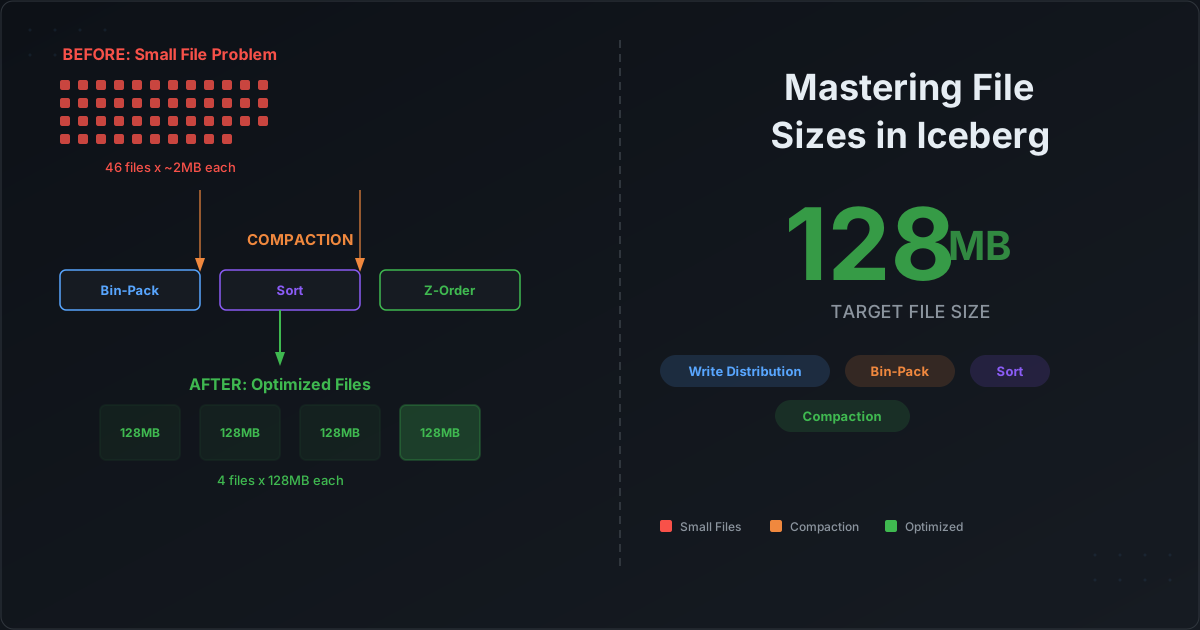
Every data engineer who has worked with Apache Iceberg at scale has hit the same wall: query performance that mysteriously degrades over time. The dashboards that used to load in two seconds now take twenty. The Spark jobs that processed in minutes now crawl for an hour. The root cause, almost always, is the same — thousands of tiny files have silently accumulated in your Iceberg tables.
The small file problem is not unique to Iceberg. But Iceberg gives you an unusually powerful set of tools to prevent it at the write layer and fix it at the maintenance layer. The catch is that most teams never configure these controls properly — or do not even know they exist.
Why Small Files Kill Performance
Before diving into the solutions, let us understand why small files are so destructive.
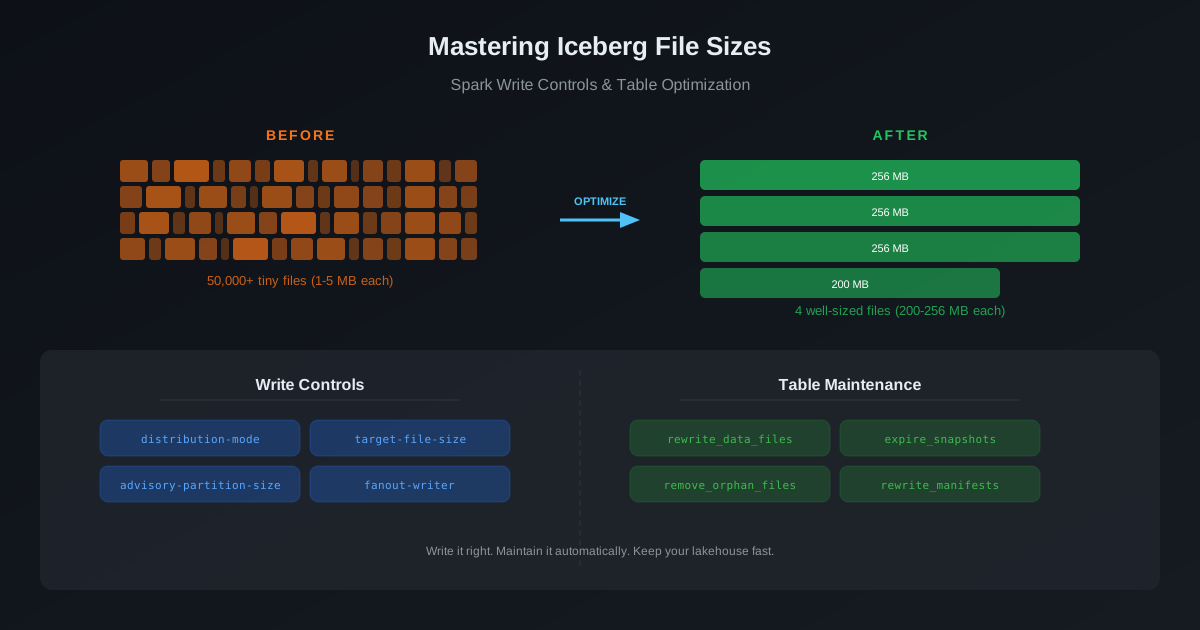
When Spark (or any engine) reads an Iceberg table, it does the following:
- Reads the metadata — manifest lists, manifest files, and column-level statistics
- Plans the scan — decides which data files contain relevant rows based on partition pruning and min/max filtering
- Opens each data file — creates a reader, reads the Parquet footer, and begins scanning
Step 3 is where small files hurt. Every file open has a fixed overhead: an S3 GetObject request (typically 5-20ms latency), a Parquet footer read, a column chunk index lookup, and a reader initialization. When your table has 100 well-sized files (128-512 MB each), this overhead is negligible. When it has 50,000 tiny files (1-5 MB each), you are paying that overhead 50,000 times — and each file contributes almost nothing in return.
The math is brutal:
| Scenario | File Count | Avg File Size | Total Data | File Open Overhead (at 10ms each) |
|---|---|---|---|---|
| Well-optimized | 200 | 256 MB | 50 GB | 2 seconds |
| Small file mess | 25,000 | 2 MB | 50 GB | 4.2 minutes |
Same data. Same table. But the small file version spends over four minutes just opening files before a single row is processed.
Beyond query performance, small files also:
- Bloat metadata — each file gets an entry in a manifest, increasing planning time
- Increase S3 API costs — more
GetObjectandListObjectscalls - Degrade downstream jobs — every pipeline that reads this table inherits the penalty
Where Small Files Come From
Small files in Iceberg tables typically originate from three patterns:
1. High-Frequency Micro-Batch Writes
Streaming or near-real-time pipelines that commit every few minutes produce a new set of files per commit. If each micro-batch writes 10 MB across 4 partitions, you get 4 files of 2.5 MB each — every few minutes, all day long. After 24 hours, a single partition could have hundreds of tiny files.
2. High-Cardinality Partitioning
If your table is partitioned by a high-cardinality column (like customer_id or user_region with hundreds of values), each Spark task may write one file per partition it encounters. With 200 Spark tasks and 100 partitions, you can end up with up to 20,000 files in a single write — most of them tiny.
3. Wrong Write Distribution Mode
This is the one most teams miss. Spark's default behavior for how it distributes data before writing to Iceberg has a direct impact on file count and file size. Choose the wrong mode, and you guarantee small files regardless of everything else.
Controlling File Sizes at Write Time with Spark
Iceberg exposes several table properties and Spark configurations that let you control file sizes at the point of writing. This is your first line of defense.
Write Distribution Mode
The write.distribution-mode table property controls how Spark shuffles data before writing it to Iceberg. This is arguably the single most important setting for file size control.
| Mode | Behavior | Best For | File Size Impact |
|---|---|---|---|
none | No shuffle. Each Spark task writes whatever data it has. | Low-latency writes where you will compact later | Produces many small files if tasks have uneven data |
hash | Hash-distributes rows by partition key before writing | Partitioned tables with even data distribution | Each partition's data is grouped, producing fewer, larger files |
range | Range-distributes by partition key and sort order | Tables with a sort order defined | Best file sizes but most expensive (two-stage shuffle) |
The default changed in Iceberg 1.2+: For partitioned tables, the default is now hash instead of the previous none. If you are on an older version, your partitioned tables may still be using none — which means every Spark task writes its own small files per partition.
-- Set write distribution mode on a table
ALTER TABLE catalog.db.events SET TBLPROPERTIES (
  'write.distribution-mode' = 'hash'
);
When to use each mode:
none: Only when write latency matters more than file sizes (e.g., streaming ingestion where you plan to compact afterward). Also useful for unpartitioned tables where data is already naturally ordered.hash: The right default for most partitioned tables. Groups partition data together so each partition gets fewer, larger files.range: When you have both partitioning and a sort order, and read performance is critical. The range shuffle is more expensive but produces globally sorted, well-sized files.
There are also separate properties for different write operations:
-- Fine-grained control per operation type
ALTER TABLE catalog.db.events SET TBLPROPERTIES (
  'write.distribution-mode'        = 'hash',    -- for INSERTs
  'write.update.distribution-mode' = 'hash',    -- for UPDATEs (CoW)
  'write.delete.distribution-mode' = 'hash',    -- for DELETEs (CoW)
  'write.merge.distribution-mode'  = 'range'    -- for MERGE operations
);
Target File Size
The write.target-file-size-bytes property tells Iceberg's rolling file writer when to close the current file and start a new one.
-- Set target file size to 256 MB
ALTER TABLE catalog.db.events SET TBLPROPERTIES (
  'write.target-file-size-bytes' = '268435456'
);
The default is 512 MB. For most analytical workloads, a target between 128 MB and 512 MB works well. The rolling writer buffers rows and creates a new data file whenever the buffered data exceeds this threshold.
Important caveat: This property controls the maximum file size, not the minimum. If a Spark task only has 5 MB of data for a partition, it will still write a 5 MB file — there is no way to force a minimum file size at write time. That is what compaction is for.
Advisory Partition Size (Spark AQE Integration)
This is a lesser-known but powerful control. When write.distribution-mode is set to hash or range, Spark's Adaptive Query Execution (AQE) controls how it coalesces and splits shuffle partitions before writing. Iceberg feeds an advisory partition size to Spark's AQE to influence this behavior.
-- Table-level advisory partition size
ALTER TABLE catalog.db.events SET TBLPROPERTIES (
  'write.spark.advisory-partition-size-bytes' = '268435456'
);

-- Or set it globally via Spark session config
-- spark.sql.iceberg.advisory-partition-size = 268435456
How it works: After the shuffle (hash or range), Spark's AQE looks at the actual data sizes and coalesces small shuffle partitions or splits large ones to match the advisory size. Iceberg's advisory size overrides Spark's default spark.sql.adaptive.advisoryPartitionSizeInBytes for Iceberg writes.
The critical detail: The advisory partition size operates on in-memory Spark row sizes, not on-disk compressed Parquet sizes. Parquet with columnar compression typically achieves 3-10x compression. So if your target file size is 256 MB on disk, you may need to set the advisory partition size to 512 MB - 1 GB to account for the compression ratio.
The default advisory partition size in recent Iceberg versions is 384 MB (up from 64 MB in earlier versions), which generally produces well-sized files for most workloads.
Fanout Writers
For partitioned tables using write.distribution-mode = none, Iceberg provides a fanout writer option:
ALTER TABLE catalog.db.events SET TBLPROPERTIES (
  'write.distribution-mode'     = 'none',
  'write.spark.fanout.enabled'  = 'true'
);
The fanout writer keeps file handles open for all partitions simultaneously, allowing each task to write to multiple partition files without requiring a shuffle. This avoids the shuffle cost but trades it for higher memory usage — each open file handle consumes memory on the executor.
Use fanout writers when: You have a moderate number of partitions (under 100), write latency is critical, and your executors have enough memory to hold multiple open file handles.
Putting It All Together: Recommended Write Configurations
For a typical partitioned Iceberg table with batch ETL workloads:
ALTER TABLE catalog.db.events SET TBLPROPERTIES (
  'write.distribution-mode'                   = 'hash',
  'write.target-file-size-bytes'              = '268435456',
  'write.spark.advisory-partition-size-bytes'  = '536870912',
  'write.parquet.compression-codec'           = 'zstd'
);
This configuration:
- Hash-distributes data by partition key, grouping each partition's data together
- Targets 256 MB data files on disk
- Sets advisory partition size to 512 MB in-memory (roughly 2x the target, accounting for compression)
- Uses ZSTD compression for better compression ratios than the default (Snappy or GZIP)
For streaming/micro-batch ingestion where you will compact later:
ALTER TABLE catalog.db.events SET TBLPROPERTIES (
  'write.distribution-mode'      = 'none',
  'write.spark.fanout.enabled'   = 'true',
  'write.target-file-size-bytes' = '134217728'
);
This prioritizes write speed and cleans up file sizes through scheduled compaction.
Table Optimization: Fixing What Write Controls Cannot Prevent
No matter how well you configure your writes, small files will still accumulate. Micro-batch writes, partition skew, and merge-on-read delete files all contribute to file proliferation over time. Iceberg provides four table maintenance procedures to address this.
1. Rewrite Data Files (Compaction)
This is the most important maintenance operation. It reads existing data files and rewrites them into fewer, larger files.
CALL catalog.system.rewrite_data_files(
  table => 'db.events',
  strategy => 'binpack',
  options => map(
    'target-file-size-bytes', '268435456',
    'min-file-size-bytes',    '104857600',
    'max-file-size-bytes',    '402653184',
    'min-input-files',        '5'
  )
);
Iceberg supports three compaction strategies:
Binpack (default): Groups small files and rewrites them to the target size. Does not reorder data. This is the cheapest and fastest strategy — use it when you just need to solve the small file problem.
CALL catalog.system.rewrite_data_files(
  table => 'db.events',
  strategy => 'binpack'
);
Sort: Rewrites files and sorts data by specified columns. More expensive than binpack because it requires a global sort, but produces files with better min/max statistics for column pruning. Queries that filter on the sort columns benefit significantly.
CALL catalog.system.rewrite_data_files(
  table => 'db.events',
  strategy => 'sort',
  sort_order => 'event_date ASC NULLS LAST, user_id ASC NULLS LAST'
);
Z-Order: Interleaves the binary representations of multiple columns into a single sortable value. This enables efficient pruning across multiple filter dimensions simultaneously — unlike a linear sort which only optimizes the first column effectively.
CALL catalog.system.rewrite_data_files(
  table => 'db.events',
  strategy => 'sort',
  sort_order => 'zorder(event_date, user_id, region)'
);
When to use which strategy:
| Strategy | Cost | Read Benefit | Best For |
|---|---|---|---|
| Binpack | Low | Fixes file sizes only | Regular maintenance, streaming tables |
| Sort | Medium | Better pruning on sort columns | Tables queried with predictable filters |
| Z-Order | High | Pruning across multiple columns | Tables queried with varying filter combinations |
Targeting specific partitions: For large tables, compact only the partitions that need it:
CALL catalog.system.rewrite_data_files(
  table => 'db.events',
  where => 'event_date >= current_date() - INTERVAL 7 DAYS'
);
2. Expire Snapshots
Every write to an Iceberg table creates a new snapshot. Over time, old snapshots accumulate and bloat the metadata. Expiring snapshots removes old metadata and makes data files that are no longer referenced by any live snapshot eligible for deletion.
CALL catalog.system.expire_snapshots(
  table => 'db.events',
  older_than => TIMESTAMP '2026-02-07 00:00:00',
  retain_last => 10
);
Best practice: Keep enough snapshots for your time travel needs (typically 3-7 days) and expire everything older. The retain_last parameter ensures you always have at least N snapshots regardless of age.
Warning: Once a snapshot is expired, you cannot time-travel to it. Plan your retention policy around your auditing and debugging requirements.
3. Remove Orphan Files
Orphan files are data files on S3 that are not referenced by any Iceberg metadata. They typically result from failed writes, aborted transactions, or bugs in external tools that interact with your storage.
CALL catalog.system.remove_orphan_files(
  table => 'db.events',
  older_than => TIMESTAMP '2026-02-09 00:00:00'
);
Critical safety rule: Never set older_than to less than your longest-running write operation. The default retention of 3 days exists for a reason — in-progress writes create files that are not yet referenced in metadata. Deleting them would corrupt the in-progress transaction.
4. Rewrite Manifests
Manifest files track which data files belong to which partitions. Over time, manifests can become fragmented — too many small manifests or manifests that reference data across many partitions. Rewriting them improves query planning performance.
CALL catalog.system.rewrite_manifests(
  table => 'db.events'
);
This operation is lightweight and fast. It reorganizes manifest entries so that each manifest covers a contiguous set of partitions, enabling faster partition pruning during query planning.
The Right Maintenance Order
Run maintenance operations in this order:
1. rewrite_data_files   →  Compact small files first
2. expire_snapshots     →  Remove old snapshot metadata
3. remove_orphan_files  →  Clean up unreferenced files
4. rewrite_manifests    →  Optimize the metadata structure
The order matters. Compaction creates new files and makes old ones obsolete. Expiring snapshots marks those obsolete files as deletable. Orphan file removal catches anything that slipped through. Manifest rewriting optimizes the final metadata structure.
The Operational Burden: Why Manual Maintenance Does Not Scale
Here is the uncomfortable reality: knowing these procedures exist is not the same as running them reliably. Most data teams face a familiar progression:
Month 1: "We will set up a cron job to compact tables every night."
Month 3: "The compaction job failed last Tuesday and nobody noticed. Three tables are degraded."
Month 6: "We have 47 Iceberg tables. Each one needs different compaction strategies, different retention policies, and different schedules. Our maintenance DAG in Airflow is more complex than our actual data pipelines."
Month 12: "We hired a platform engineer just to manage Iceberg table maintenance."
The problem is not that the tools are insufficient — Iceberg's maintenance procedures are excellent. The problem is that manual maintenance does not scale with the number of tables. Every new table needs its own compaction schedule, its own retention policy, its own monitoring, and its own alerting when maintenance fails.
This is exactly the problem that policy-based table optimization solves — and it is what we will cover in our next post on Apache Polaris and Cazpian's managed catalog.
Quick Reference: All Write and Maintenance Properties
Write-Time Properties (Table Properties)
| Property | Default | Description |
|---|---|---|
write.distribution-mode | hash (partitioned) / none (unpartitioned) | Shuffle mode before writing: none, hash, range |
write.target-file-size-bytes | 536870912 (512 MB) | Target size for output data files |
write.delete.target-file-size-bytes | 67108864 (64 MB) | Target size for delete files |
write.spark.advisory-partition-size-bytes | Iceberg calculated | Advisory partition size for Spark AQE |
write.spark.fanout.enabled | false | Enable fanout writer (for none distribution mode) |
write.parquet.compression-codec | gzip | Parquet compression: snappy, gzip, zstd, lz4 |
Maintenance Procedures
| Procedure | Purpose | Frequency |
|---|---|---|
rewrite_data_files | Compact small files into larger ones | Daily to weekly (depending on write frequency) |
expire_snapshots | Remove old snapshot metadata | Daily |
remove_orphan_files | Delete unreferenced data files | Weekly |
rewrite_manifests | Optimize manifest file structure | Weekly to monthly |
Tired of managing Iceberg table maintenance manually? In our next post, we will explore how Apache Polaris and Cazpian's managed catalog use policy-based optimization to handle compaction, snapshot expiry, and file cleanup automatically — so your team can focus on building pipelines, not babysitting tables. Stay tuned.