23 posts tagged with "Lakehouse"

View All Tags

Iceberg Metrics Reporting: How to Monitor Scan and Commit Health with Spark

· 20 min read
Cazpian Engineering
Platform Engineering Team

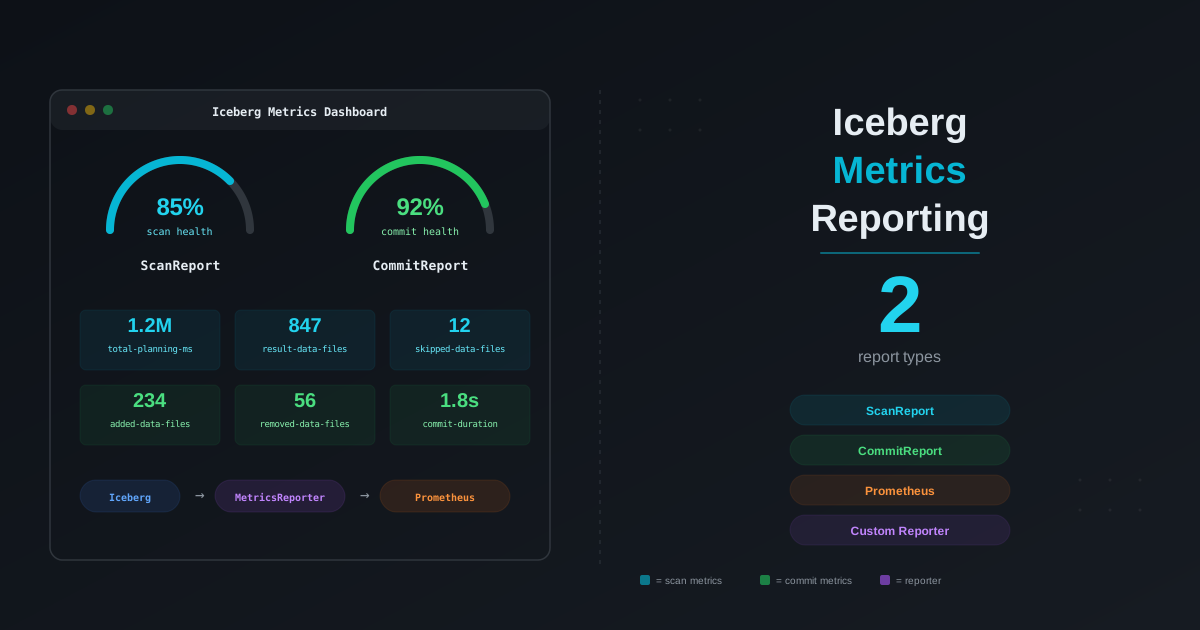
Iceberg Metrics Reporting: How to Monitor Scan and Commit Health with Spark

You designed the partitions correctly. You set up compaction. You even configured bloom filters. But your Iceberg tables are still slow — and you have no idea why. Is it the scan planning? Too many manifests? Delete files accumulating silently? Commit retries from writer contention? You cannot fix what you cannot see.

Apache Iceberg actually gives you everything you need to diagnose table health. The problem is that the metrics are scattered across six different layers — a Java API, virtual SQL tables, snapshot properties, file-level statistics, Puffin blobs, and engine-level instrumentation — and no one has assembled them into a single picture. This post does exactly that.

We will walk through every layer of Iceberg metrics, show you how to collect them, explain what each metric means for your read and write performance, and give you concrete thresholds and SQL queries that tell you when something is wrong and what to do about it.

Iceberg Bloom Filters with Spark: Configuration, Validation, and Performance Guide

· 21 min read
Cazpian Engineering
Platform Engineering Team

Iceberg Bloom Filters with Spark: Configuration, Validation, and Performance Guide

When you query an Iceberg table with WHERE user_id = 'abc-123', Spark reads every Parquet file that could contain that value. It first checks partition pruning — does this file belong to the right partition? Then it checks column statistics — does the min/max range for user_id in this file include 'abc-123'? But for high-cardinality columns like UUIDs, user IDs, session IDs, or trace IDs, min/max statistics are nearly useless. The min might be 'aaa...' and the max might be 'zzz...', so every file passes the min/max check even though only one file actually contains the value.

This is where bloom filters come in. A bloom filter is a compact probabilistic data structure embedded in each Parquet file that can definitively say "this value is NOT in this file" — allowing Spark to skip the file entirely. For point lookups on high-cardinality columns, bloom filters can reduce I/O by 80-90%.

This post covers everything you need to know: how bloom filters work internally, when to use them, how to configure them on Iceberg tables, how to validate they are present in your Parquet files, and what false positives mean for your data correctness.

Storage Partitioned Joins in Apache Iceberg with Spark

· 13 min read
Cazpian Engineering
Platform Engineering Team

Storage Partitioned Joins in Apache Iceberg with Spark

Every Spark join starts the same way: read both sides, shuffle the data across the network so matching keys end up on the same executor, then join. That shuffle is the single most expensive operation in most Spark jobs — it moves data across the network, writes temporary files to disk, and consumes memory on every executor in the cluster.

But what if both tables are already organized by the join key on disk? If the left table's customer_id=42 rows are in bucket 42 and the right table's customer_id=42 rows are also in bucket 42, there is nothing to shuffle. Each executor can join its local partitions independently.

That is exactly what Storage Partitioned Join (SPJ) does. Introduced in Spark 3.3 and matured in Spark 3.4+, SPJ is the most impactful — and least understood — optimization available for Iceberg+Spark workloads. This post shows you how it works, how to set it up, how to verify it, and where it breaks.

Iceberg on AWS: S3FileIO, Glue Catalog, and Performance Optimization Guide

· 20 min read
Cazpian Engineering
Platform Engineering Team

Iceberg on AWS: S3FileIO, Glue Catalog, and Performance Optimization Guide

If you are running Apache Iceberg on AWS, the single most impactful configuration decision you will make is your choice of FileIO implementation. Most teams start with HadoopFileIO and s3a:// paths because that is what their existing Hadoop-based stack already uses. It works, but it leaves significant performance on the table.

Iceberg's native S3FileIO was built from the ground up for object storage. It uses the AWS SDK v2 directly, skips the Hadoop filesystem abstraction entirely, and implements optimizations that s3a cannot — progressive multipart uploads, native bulk deletes, and zero serialization overhead. Teams that switch typically see faster writes, faster commits, and lower memory usage across the board.

This post covers everything you need to run Iceberg on AWS efficiently: why S3FileIO outperforms s3a, how to configure every critical property, how to avoid S3 throttling, how to set up Glue catalog correctly, and how to secure your tables with encryption and credential vending.

Iceberg CDC: Patterns, Best Practices, and Real-World Pipelines

· 14 min read
Cazpian Engineering
Platform Engineering Team

Iceberg CDC Patterns and Pipelines

You have an operational database — PostgreSQL, MySQL, or DynamoDB — and you need its data in your Iceberg lakehouse. Not a daily snapshot dump. Not a nightly batch export. You need changes replicated continuously so that your analytics, ML models, and dashboards reflect reality within minutes.

This is Change Data Capture (CDC) on Iceberg, and it is one of the most common — and most operationally challenging — data engineering patterns in production today. The ingestion part is straightforward. The hard parts are handling deletes efficiently, keeping read performance from degrading, managing schema changes, and operating the pipeline at scale without it falling over at 3 AM.

This guide covers the two primary CDC architectures (direct materialization and the bronze-silver pattern), table design for CDC workloads, Iceberg's built-in CDC capabilities, compaction strategies, and the operational patterns that keep CDC pipelines healthy in production.

Writing Efficient MERGE INTO Queries on Iceberg with Spark

· 13 min read
Cazpian Engineering
Platform Engineering Team

Writing Efficient MERGE INTO Queries on Iceberg

MERGE INTO is the most powerful and the most misused operation in Apache Iceberg. It handles upserts, conditional deletes, SCD Type-2 updates, and CDC application — all in a single atomic statement. But it is also the operation most likely to trigger a full table scan, blow up your compute costs, and produce thousands of small files if you do not write it carefully.

The difference between a well-written and a poorly-written MERGE INTO on the same table can be the difference between 30 seconds and 30 minutes — and between $2 and $200 in compute cost. This post shows you exactly how to write it right.

Iceberg Backup, Recovery, and Disaster Recovery: A Complete Guide

· 15 min read
Cazpian Engineering
Platform Engineering Team

Iceberg Backup Recovery and Disaster Recovery

Someone dropped the table. Or worse — they dropped it and ran expire_snapshots and remove_orphan_files. The catalog entry is gone. The metadata cleanup already happened. Your Slack channel is on fire. Can you recover?

The answer depends entirely on what you set up before the disaster. Apache Iceberg does not have a built-in backup command. There is no UNDROP TABLE that magically restores everything. But Iceberg's architecture — with its layered metadata files, immutable snapshots, and absolute file paths — gives you powerful building blocks for backup and recovery if you understand how they work.

This guide covers three scenarios: recovering a dropped table when data files still exist on S3, building a proper backup strategy so you are always prepared, and setting up cross-region disaster recovery for production-critical tables.

Iceberg Query Performance Tuning: Partition Pruning, Bloom Filters, and Spark Configs

· 19 min read
Cazpian Engineering
Platform Engineering Team

Iceberg Query Performance Tuning

Your Iceberg tables are created with the right properties. Your partitions are well-designed. But your queries are still slower than you expected. The dashboard that should load in 3 seconds takes 45. The data scientist's notebook times out. The problem is not your table design — it is that you have not tuned the layers between the query and the data.

Apache Iceberg has a sophisticated query planning pipeline that can skip entire partitions, skip individual files within a partition, and even skip row groups within a file. But each of these layers only works if you configure it correctly. This post walks through every pruning layer, explains exactly how Iceberg uses metadata to skip work, and gives you the Spark configurations to control it all.

Iceberg Table Design: Properties, Partitioning, and Commit Best Practices

· 26 min read
Cazpian Engineering
Platform Engineering Team

Iceberg Table Design

You have just migrated to Apache Iceberg — or you are about to create your first Iceberg table. You open the documentation and find dozens of table properties, multiple partition transforms, and configuration knobs that interact with each other in non-obvious ways. Where do you start? Which properties actually matter? How many buckets should you use? What happens when two jobs write to the same table at the same time?

This guide answers all of those questions. We will walk through every table property that matters for production Iceberg tables, explain how to design partition specs that balance read and write performance, cover commit conflict resolution, and give you concrete recommendations for both partitioned and non-partitioned tables.

How Apache Iceberg Makes Your Data AI-Ready: Feature Stores, Training Pipelines, and Agentic AI

· 12 min read
Cazpian Engineering
Platform Engineering Team

How Apache Iceberg Makes Your Data AI-Ready

Every AI project starts with the same bottleneck: data. Not the volume of data — most organizations have plenty of that. The bottleneck is data quality, data versioning, and data reproducibility. Can you guarantee that the dataset you trained on last month has not changed? Can you trace exactly which features went into a model prediction? Can you roll back a corrupted training set in minutes instead of days?

These are data engineering problems, not machine learning problems. And Apache Iceberg — originally built for large-scale analytics — turns out to solve them remarkably well.

This post covers four concrete patterns for using Iceberg as the data foundation for AI workloads: feature stores, training data versioning, LLM fine-tuning pipelines, and agentic AI data access.