Spark Runtime Metrics Collection with DriverPlugin, ExecutorPlugin, and SparkListener

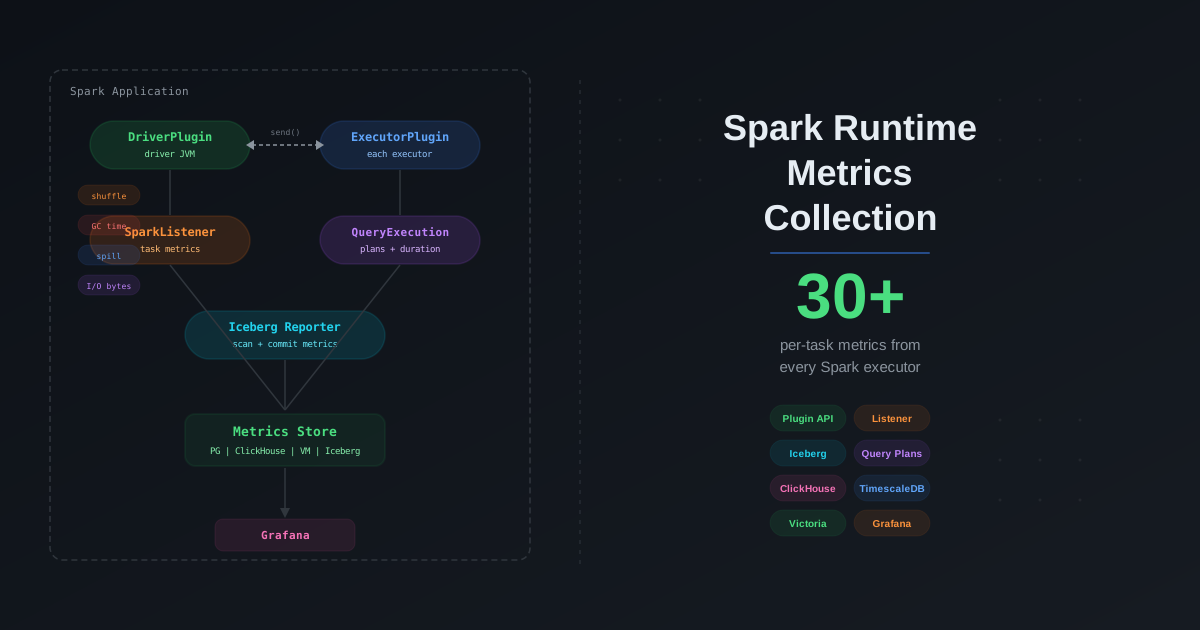
You tuned your Spark cluster. You picked the right join strategies. You enabled AQE. But you are still flying blind. When a job takes twice as long as yesterday, you open the Spark UI, scroll through 200 stages, and guess. When an Iceberg scan suddenly plans for 12 seconds instead of 2, you have no history to compare against. You cannot trend what you do not collect.
Apache Spark ships a powerful but underused plugin system — DriverPlugin, ExecutorPlugin, and SparkListener — that lets you tap into every metric the engine produces at runtime. Combined with Iceberg's MetricsReporter, you get a unified view of compute and storage performance for every query, every task, and every table scan. This post shows you how to build that pipeline from scratch, store the metrics at scale, and turn raw numbers into actionable performance insights.
Why the Spark UI Is Not Enough
The Spark UI is great for debugging a single job in real time. It is terrible for everything else:
| Limitation | Impact |
|---|---|
| No historical retention | UI data disappears when the application ends unless you configure a History Server |
| No cross-job comparison | Cannot compare Tuesday's run against Wednesday's to find regressions |
| No alerting | No way to fire a Slack message when shuffle spill exceeds 10 GB |
| No Iceberg context | Zero visibility into scan planning duration, manifest pruning, or commit contention |
| Manual inspection | You must click through stages and tasks one at a time — does not scale to hundreds of daily jobs |
You need structured metrics, persisted to a queryable store, with enough dimensionality to slice by job, stage, table, and date.
Architecture Overview
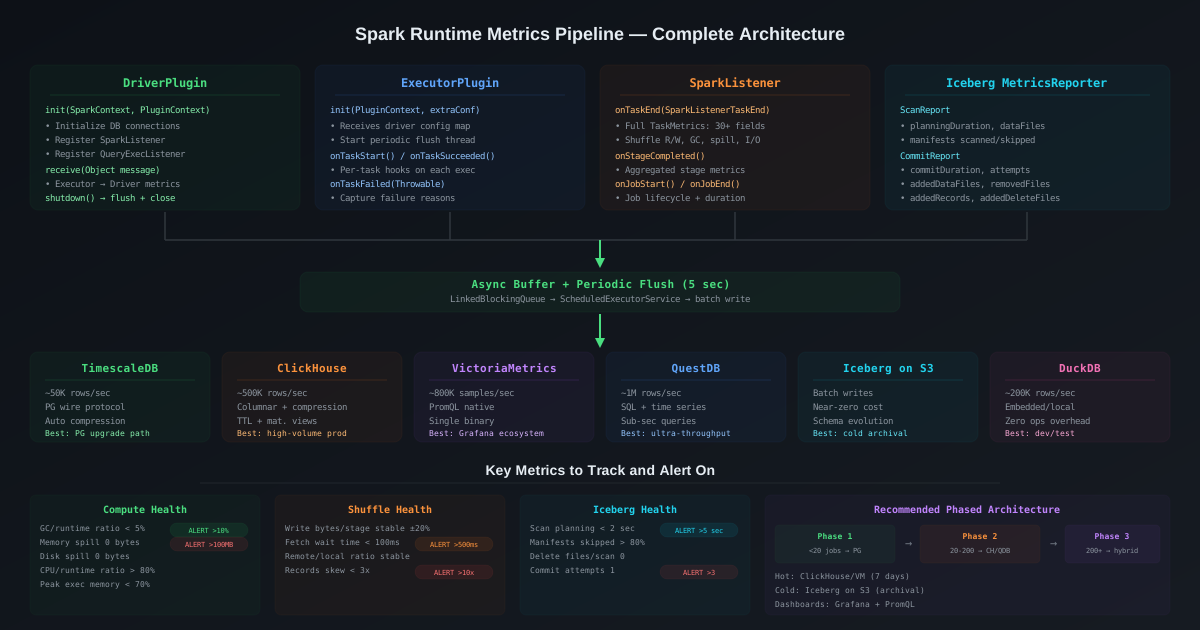
The complete metrics pipeline has four collection layers feeding into a unified storage backend:
┌─────────────────────────────────────────────────────────────────────┐
│                        Spark Application                            │
│                                                                     │
│  ┌──────────────────┐  ┌──────────────────┐  ┌──────────────────┐  │
│  │   DriverPlugin   │  │  ExecutorPlugin   │  │   SparkListener  │  │
│  │  (driver JVM)    │  │  (each executor)  │  │   (driver JVM)   │  │
│  │                  │  │                   │  │                  │  │
│  │ • Init resources │  │ • Per-task hooks  │  │ • Job/Stage/Task │  │
│  │ • Aggregate      │  │ • JVM metrics     │  │   lifecycle      │  │
│  │ • Shutdown flush │  │ • Custom counters │  │ • Full TaskMetrics│  │
│  └────────┬─────────┘  └────────┬──────────┘  └────────┬─────────┘  │
│           │                     │                       │            │
│  ┌────────┴─────────────────────┴───────────────────────┴─────────┐ │
│  │              QueryExecutionListener (driver JVM)                │ │
│  │  • SQL text, logical/physical plans, duration per query        │ │
│  └────────┬───────────────────────────────────────────────────────┘ │
│           │                                                         │
│  ┌────────┴───────────────────────────────────────────────────────┐ │
│  │            Iceberg MetricsReporter (driver JVM)                │ │
│  │  • ScanReport: planning duration, manifests, files pruned     │ │
│  │  • CommitReport: commit duration, attempts, files added       │ │
│  └────────┬───────────────────────────────────────────────────────┘ │
└───────────┼─────────────────────────────────────────────────────────┘
            │
            ▼
   ┌─────────────────┐
   │  Metrics Store   │
   │  (see §Storage)  │
   └─────────────────┘
Each layer captures a different dimension:
| Layer | Runs On | What It Captures |
|---|---|---|
DriverPlugin | Driver JVM | Initialization, resource setup, aggregation, shutdown hooks |
ExecutorPlugin | Every executor JVM | Per-task metrics, JVM-level stats, custom counters |
SparkListener | Driver JVM | Complete job/stage/task lifecycle with full TaskMetrics |
QueryExecutionListener | Driver JVM | SQL text, query plans (logical, optimized, physical), wall-clock duration |
Iceberg MetricsReporter | Driver JVM | Scan planning, manifest pruning, commit duration and retry counts |
The Spark Plugin API (SPARK-29397)
Introduced in Spark 3.0 via SPARK-29397, the plugin API gives you lifecycle hooks on both the driver and every executor. You register a single SparkPlugin that returns a DriverPlugin and an ExecutorPlugin.
SparkPlugin — The Entry Point
import org.apache.spark.api.plugin.SparkPlugin;
import org.apache.spark.api.plugin.DriverPlugin;
import org.apache.spark.api.plugin.ExecutorPlugin;

public class MetricsPlugin implements SparkPlugin {

    @Override
    public DriverPlugin driverPlugin() {
        return new MetricsDriverPlugin();
    }

    @Override
    public ExecutorPlugin executorPlugin() {
        return new MetricsExecutorPlugin();
    }
}
Register it with a single Spark config:
spark.plugins=com.cazpian.spark.MetricsPlugin
That is it. Spark will instantiate your plugin on startup, call driverPlugin() once on the driver, and call executorPlugin() on every executor as they register.
DriverPlugin — Driver-Side Lifecycle
The DriverPlugin runs in the driver JVM. Its primary jobs are initializing shared resources (database connections, metric registries) and aggregating data at shutdown.
import org.apache.spark.api.plugin.DriverPlugin;
import org.apache.spark.api.plugin.PluginContext;
import org.apache.spark.SparkContext;

import java.util.Map;
import java.util.Collections;

public class MetricsDriverPlugin implements DriverPlugin {

    private MetricsStore metricsStore;

    @Override
    public Map<String, String> init(SparkContext sc, PluginContext ctx) {
        // Called once when the driver starts.
        // Return value is a map passed to every ExecutorPlugin.init().
        String appId = sc.applicationId();
        String appName = sc.appName();

        // Initialize the metrics store (DB connection, HTTP client, etc.)
        metricsStore = MetricsStoreFactory.create(
            sc.getConf().get("spark.cazpian.metrics.backend", "postgres")
        );
        metricsStore.init();

        // Register SparkListener for task/stage/job events
        sc.addSparkListener(new MetricsSparkListener(metricsStore, appId, appName));

        // Return metadata to executor plugins
        return Map.of(
            "appId", appId,
            "appName", appName,
            "metricsBackend", sc.getConf().get("spark.cazpian.metrics.backend", "postgres")
        );
    }

    @Override
    public void registerMetrics(String appId, PluginContext ctx) {
        // Optional: register custom Spark metrics via the Codahale registry.
        // ctx.metricRegistry() returns the shared MetricRegistry.
    }

    @Override
    public void receive(Object message) {
        // Receive messages sent from ExecutorPlugins via PluginContext.send().
        // Useful for executor → driver metric aggregation.
        if (message instanceof ExecutorMetricsBatch batch) {
            metricsStore.writeBatch(batch);
        }
    }

    @Override
    public void shutdown() {
        // Called when the SparkContext is stopped.
        // Flush buffered metrics, close connections.
        if (metricsStore != null) {
            metricsStore.flush();
            metricsStore.close();
        }
    }
}
Key points:
init()returns aMap<String, String>that is automatically forwarded to every executor'sExecutorPlugin.init()— use this to pass connection strings, application IDs, or feature flags without relying on broadcast variables.receive()accepts messages sent from executors viaPluginContext.send()— this is your executor→driver communication channel.shutdown()is your last chance to flush buffered metrics before the JVM exits.
ExecutorPlugin — Executor-Side Hooks
The ExecutorPlugin runs on every executor JVM. It has hooks for initialization, per-task callbacks, and shutdown.
import org.apache.spark.api.plugin.ExecutorPlugin;
import org.apache.spark.api.plugin.PluginContext;

import java.util.Map;
import java.util.concurrent.ConcurrentLinkedQueue;
import java.util.concurrent.Executors;
import java.util.concurrent.ScheduledExecutorService;
import java.util.concurrent.TimeUnit;

public class MetricsExecutorPlugin implements ExecutorPlugin {

    private PluginContext pluginContext;
    private String executorId;
    private String appId;
    private final ConcurrentLinkedQueue<TaskMetricsSnapshot> buffer =
        new ConcurrentLinkedQueue<>();
    private ScheduledExecutorService scheduler;

    @Override
    public void init(PluginContext ctx, Map<String, String> extraConf) {
        // Called once when the executor registers with the driver.
        // extraConf contains the map returned by DriverPlugin.init().
        this.pluginContext = ctx;
        this.executorId = ctx.executorID();
        this.appId = extraConf.getOrDefault("appId", "unknown");

        // Start a periodic flush to send buffered metrics to the driver
        scheduler = Executors.newSingleThreadScheduledExecutor();
        scheduler.scheduleAtFixedRate(this::flushToDriver, 10, 10, TimeUnit.SECONDS);
    }

    @Override
    public void onTaskStart() {
        // Called at the beginning of every task on this executor.
        // Capture start timestamp for custom duration tracking.
    }

    @Override
    public void onTaskSucceeded() {
        // Called when a task completes successfully.
        // Note: TaskMetrics are NOT available here — use SparkListener instead.
    }

    @Override
    public void onTaskFailed(Throwable failureReason) {
        // Called when a task fails. Log the failure reason.
        buffer.add(TaskMetricsSnapshot.failure(executorId, failureReason));
    }

    @Override
    public void shutdown() {
        // Flush remaining metrics and stop the scheduler.
        flushToDriver();
        if (scheduler != null) {
            scheduler.shutdown();
        }
    }

    private void flushToDriver() {
        if (buffer.isEmpty()) return;
        ExecutorMetricsBatch batch = new ExecutorMetricsBatch(executorId);
        TaskMetricsSnapshot snapshot;
        while ((snapshot = buffer.poll()) != null) {
            batch.add(snapshot);
        }
        // Send to driver via the plugin communication channel
        pluginContext.send(batch);
    }
}
Important limitation: The ExecutorPlugin task callbacks (onTaskSucceeded, onTaskFailed) do not provide access to TaskMetrics. To get shuffle bytes, spill sizes, GC time, and other per-task metrics, you need a SparkListener on the driver side listening for SparkListenerTaskEnd events.
The DriverPlugin ↔ ExecutorPlugin Communication Channel
The plugin API provides a built-in message-passing mechanism:
ExecutorPlugin                          DriverPlugin
     │                                       │
     │  pluginContext.send(message)           │
     │ ─────────────────────────────────────► │
     │                                       │  receive(message)
     │                                       │
- Executor → Driver: Call
pluginContext.send(Object)from the executor. The driver'sDriverPlugin.receive(Object)is called with the message. Messages must be serializable. - Driver → Executor: Use the
Map<String, String>returned fromDriverPlugin.init()for one-time configuration. For runtime communication, use Spark's broadcast or accumulator mechanisms.
This channel is ideal for aggregating executor-local JVM metrics (heap usage, GC counts, custom counters) at the driver for centralized storage.
SparkListener — The Metrics Goldmine
While the plugin API gives you lifecycle hooks, SparkListener is where the real metrics live. It runs on the driver and receives callbacks for every significant event in the Spark execution lifecycle.
Available Event Callbacks
| Event | When It Fires | Key Data |
|---|---|---|
onJobStart | Job submitted | Job ID, stage IDs, submission time |
onJobEnd | Job completed | Job ID, result (success/failure), completion time |
onStageSubmitted | Stage scheduled | Stage ID, stage name, number of tasks |
onStageCompleted | Stage finished | Stage ID, full TaskMetrics aggregated, failure reason |
onTaskStart | Task begins | Task ID, executor ID, host, partition ID |
onTaskEnd | Task finishes | Task ID, full TaskMetrics, duration, GC time |
onExecutorAdded | Executor registers | Executor ID, host, total cores |
onExecutorRemoved | Executor deregisters | Executor ID, removal reason |
onBlockManagerAdded | Block manager starts | Executor ID, max memory |
onEnvironmentUpdate | Configs changed | Full Spark properties, classpath, JVM info |
TaskMetrics — Every Number You Need
The TaskMetrics object available in onTaskEnd and onStageCompleted contains the complete picture of what a task did:
Core Metrics:
| Metric | Method | What It Tells You |
|---|---|---|
| Executor run time | executorRunTime | Wall-clock time the task ran (ms) |
| Executor CPU time | executorCpuTime | CPU time consumed (ns) — ratio to run time shows I/O wait |
| JVM GC time | jvmGCTime | Time spent in garbage collection (ms) |
| Result size | resultSize | Size of the serialized task result sent back to driver |
| Result serialization time | resultSerializationTime | Time spent serializing the result |
| Memory bytes spilled | memoryBytesSpilled | Data spilled from memory to disk — indicates memory pressure |
| Disk bytes spilled | diskBytesSpilled | Data written to disk during spills |
| Peak execution memory | peakExecutionMemory | Maximum execution memory used during the task |
Shuffle Write Metrics:
| Metric | Method | What It Tells You |
|---|---|---|
| Bytes written | shuffleWriteMetrics.bytesWritten | Total shuffle data produced |
| Records written | shuffleWriteMetrics.recordsWritten | Total shuffle records produced |
| Write time | shuffleWriteMetrics.writeTime | Time spent writing shuffle files (ns) |
Shuffle Read Metrics:
| Metric | Method | What It Tells You |
|---|---|---|
| Remote bytes read | shuffleReadMetrics.remoteBytesRead | Shuffle data fetched from other executors |
| Local bytes read | shuffleReadMetrics.localBytesRead | Shuffle data read from the same executor |
| Fetch wait time | shuffleReadMetrics.fetchWaitDuration | Time spent waiting for shuffle blocks — high values indicate network bottlenecks |
| Records read | shuffleReadMetrics.recordsRead | Total shuffle records consumed |
| Remote blocks fetched | shuffleReadMetrics.remoteBlocksFetched | Number of remote shuffle blocks |
| Local blocks fetched | shuffleReadMetrics.localBlocksFetched | Number of local shuffle blocks |
Input/Output Metrics:
| Metric | Method | What It Tells You |
|---|---|---|
| Bytes read | inputMetrics.bytesRead | Data read from data sources (HDFS, S3, Parquet) |
| Records read | inputMetrics.recordsRead | Records read from data sources |
| Bytes written | outputMetrics.bytesWritten | Data written to output sinks |
| Records written | outputMetrics.recordsWritten | Records written to output sinks |
Implementation — MetricsSparkListener
import org.apache.spark.scheduler.*;
import org.apache.spark.executor.TaskMetrics;

import java.util.Map;
import java.util.concurrent.ConcurrentHashMap;

public class MetricsSparkListener extends SparkListener {

    private final MetricsStore store;
    private final String appId;
    private final String appName;
    private final Map<Integer, Long> jobStartTimes = new ConcurrentHashMap<>();
    private final Map<Integer, Long> stageStartTimes = new ConcurrentHashMap<>();

    public MetricsSparkListener(MetricsStore store, String appId, String appName) {
        this.store = store;
        this.appId = appId;
        this.appName = appName;
    }

    @Override
    public void onJobStart(SparkListenerJobStart event) {
        jobStartTimes.put(event.jobId(), System.currentTimeMillis());
        store.writeJobEvent(JobEvent.builder()
            .appId(appId)
            .appName(appName)
            .jobId(event.jobId())
            .stageIds(event.stageIds())
            .submissionTime(event.time())
            .properties(extractProperties(event.properties()))
            .build()
        );
    }

    @Override
    public void onJobEnd(SparkListenerJobEnd event) {
        long startTime = jobStartTimes.getOrDefault(event.jobId(), 0L);
        long duration = System.currentTimeMillis() - startTime;
        store.writeJobCompletion(JobCompletion.builder()
            .appId(appId)
            .jobId(event.jobId())
            .result(event.jobResult().toString())
            .durationMs(duration)
            .completionTime(event.time())
            .build()
        );
    }

    @Override
    public void onStageCompleted(SparkListenerStageCompleted event) {
        StageInfo info = event.stageInfo();
        TaskMetrics metrics = info.taskMetrics();

        if (metrics == null) return; // Stage was cancelled

        store.writeStageMetrics(StageMetricsRecord.builder()
            .appId(appId)
            .stageId(info.stageId())
            .stageName(info.name())
            .attemptNumber(info.attemptNumber())
            .numTasks(info.numTasks())
            // Core metrics
            .executorRunTimeMs(metrics.executorRunTime())
            .executorCpuTimeNs(metrics.executorCpuTime())
            .jvmGcTimeMs(metrics.jvmGCTime())
            .memoryBytesSpilled(metrics.memoryBytesSpilled())
            .diskBytesSpilled(metrics.diskBytesSpilled())
            .peakExecutionMemory(metrics.peakExecutionMemory())
            // Shuffle write
            .shuffleBytesWritten(metrics.shuffleWriteMetrics().bytesWritten())
            .shuffleRecordsWritten(metrics.shuffleWriteMetrics().recordsWritten())
            .shuffleWriteTimeNs(metrics.shuffleWriteMetrics().writeTime())
            // Shuffle read
            .shuffleRemoteBytesRead(metrics.shuffleReadMetrics().remoteBytesRead())
            .shuffleLocalBytesRead(metrics.shuffleReadMetrics().localBytesRead())
            .shuffleFetchWaitTimeMs(metrics.shuffleReadMetrics().fetchWaitDuration())
            .shuffleRecordsRead(metrics.shuffleReadMetrics().recordsRead())
            // I/O
            .inputBytesRead(metrics.inputMetrics().bytesRead())
            .inputRecordsRead(metrics.inputMetrics().recordsRead())
            .outputBytesWritten(metrics.outputMetrics().bytesWritten())
            .outputRecordsWritten(metrics.outputMetrics().recordsWritten())
            .build()
        );
    }

    @Override
    public void onTaskEnd(SparkListenerTaskEnd event) {
        TaskMetrics metrics = event.taskMetrics();
        if (metrics == null) return;

        store.writeTaskMetrics(TaskMetricsRecord.builder()
            .appId(appId)
            .stageId(event.stageId())
            .taskId(event.taskInfo().taskId())
            .executorId(event.taskInfo().executorId())
            .host(event.taskInfo().host())
            .partitionId(event.taskInfo().partitionId())
            .durationMs(event.taskInfo().duration())
            .successful(event.taskInfo().successful())
            .gcTimeMs(metrics.jvmGCTime())
            .peakMemory(metrics.peakExecutionMemory())
            .memorySpilled(metrics.memoryBytesSpilled())
            .diskSpilled(metrics.diskBytesSpilled())
            .shuffleBytesWritten(metrics.shuffleWriteMetrics().bytesWritten())
            .shuffleBytesRead(
                metrics.shuffleReadMetrics().remoteBytesRead()
                + metrics.shuffleReadMetrics().localBytesRead()
            )
            .inputBytesRead(metrics.inputMetrics().bytesRead())
            .outputBytesWritten(metrics.outputMetrics().bytesWritten())
            .build()
        );
    }
}
QueryExecutionListener — SQL-Level Metrics
For SQL/DataFrame queries, the QueryExecutionListener gives you access to the full query plan and execution duration:
import org.apache.spark.sql.util.QueryExecutionListener;
import org.apache.spark.sql.execution.QueryExecution;

public class MetricsQueryListener implements QueryExecutionListener {

    private final MetricsStore store;
    private final String appId;

    public MetricsQueryListener(MetricsStore store, String appId) {
        this.store = store;
        this.appId = appId;
    }

    @Override
    public void onSuccess(String funcName, QueryExecution qe, long durationNs) {
        store.writeQueryMetrics(QueryMetricsRecord.builder()
            .appId(appId)
            .funcName(funcName)
            .durationMs(durationNs / 1_000_000)
            .logicalPlan(qe.logical().toString())
            .optimizedPlan(qe.optimizedPlan().toString())
            .physicalPlan(qe.executedPlan().toString())
            .succeeded(true)
            .build()
        );
    }

    @Override
    public void onFailure(String funcName, QueryExecution qe, Exception exception) {
        store.writeQueryMetrics(QueryMetricsRecord.builder()
            .appId(appId)
            .funcName(funcName)
            .physicalPlan(qe.executedPlan() != null ? qe.executedPlan().toString() : "N/A")
            .succeeded(false)
            .errorMessage(exception.getMessage())
            .build()
        );
    }
}
Register it alongside the SparkListener in your DriverPlugin.init():
@Override
public Map<String, String> init(SparkContext sc, PluginContext ctx) {
    // ... existing setup ...

    // Register the SparkListener
    sc.addSparkListener(new MetricsSparkListener(metricsStore, appId, appName));

    // Register the QueryExecutionListener
    SparkSession.active().listenerManager()
        .register(new MetricsQueryListener(metricsStore, appId));

    return Map.of("appId", appId, "appName", appName);
}
This captures query-level performance data that complements the task-level metrics from the SparkListener. You can correlate a slow query's plan with the stage and task metrics that executed it.
Integrating Iceberg MetricsReporter
If you are running Iceberg tables (and if you are reading this blog, you probably are), you should also collect Iceberg's own metrics alongside Spark compute metrics. Iceberg provides ScanReport and CommitReport through its MetricsReporter interface.
For a deep dive on every Iceberg metric, thresholds, and health diagnostics, see our Iceberg Metrics Reporting post.
Unified MetricsReporter
import org.apache.iceberg.metrics.MetricsReporter;
import org.apache.iceberg.metrics.MetricsReport;
import org.apache.iceberg.metrics.ScanReport;
import org.apache.iceberg.metrics.CommitReport;

public class UnifiedIcebergMetricsReporter implements MetricsReporter {

    private final MetricsStore store;

    public UnifiedIcebergMetricsReporter(MetricsStore store) {
        this.store = store;
    }

    @Override
    public void report(MetricsReport report) {
        if (report instanceof ScanReport scan) {
            store.writeIcebergScanMetrics(IcebergScanRecord.builder()
                .tableName(scan.tableName())
                .snapshotId(scan.snapshotId())
                .planningDurationMs(scan.scanMetrics()
                    .totalPlanningDuration().totalDuration().toMillis())
                .resultDataFiles(scan.scanMetrics()
                    .resultDataFiles().value())
                .resultDeleteFiles(scan.scanMetrics()
                    .resultDeleteFiles().value())
                .totalDataManifests(scan.scanMetrics()
                    .totalDataManifests().value())
                .skippedDataManifests(scan.scanMetrics()
                    .skippedDataManifests().value())
                .totalFileSizeBytes(scan.scanMetrics()
                    .totalFileSizeInBytes().value())
                .build()
            );
        } else if (report instanceof CommitReport commit) {
            store.writeIcebergCommitMetrics(IcebergCommitRecord.builder()
                .tableName(commit.tableName())
                .operation(commit.operation())
                .commitDurationMs(commit.commitMetrics()
                    .totalDuration().totalDuration().toMillis())
                .attempts(commit.commitMetrics()
                    .attempts().value())
                .addedDataFiles(commit.commitMetrics()
                    .addedDataFiles().value())
                .removedDataFiles(commit.commitMetrics()
                    .removedDataFiles().value())
                .addedDeleteFiles(commit.commitMetrics()
                    .addedDeleteFiles().value())
                .addedRecords(commit.commitMetrics()
                    .addedRecords().value())
                .build()
            );
        }
    }
}
Register the reporter in your Spark session config:
spark.sql.catalog.my_catalog.metrics-reporter-impl=com.cazpian.iceberg.UnifiedIcebergMetricsReporter
Or register it programmatically inside your DriverPlugin.init() by adding it to the Iceberg catalog configuration.
Putting It All Together — The Unified Plugin
Here is the complete SparkPlugin implementation that wires everything together:
public class CazpianMetricsPlugin implements SparkPlugin {

    @Override
    public DriverPlugin driverPlugin() {
        return new DriverPlugin() {
            private MetricsStore store;

            @Override
            public Map<String, String> init(SparkContext sc, PluginContext ctx) {
                String appId = sc.applicationId();
                String appName = sc.appName();
                String backend = sc.getConf()
                    .get("spark.cazpian.metrics.backend", "postgres");

                // Initialize storage
                store = MetricsStoreFactory.create(backend);
                store.init();

                // Register SparkListener
                sc.addSparkListener(
                    new MetricsSparkListener(store, appId, appName));

                // Register QueryExecutionListener
                SparkSession.active().listenerManager()
                    .register(new MetricsQueryListener(store, appId));

                return Map.of(
                    "appId", appId,
                    "appName", appName
                );
            }

            @Override
            public void receive(Object msg) {
                if (msg instanceof ExecutorMetricsBatch batch) {
                    store.writeBatch(batch);
                }
            }

            @Override
            public void shutdown() {
                if (store != null) {
                    store.flush();
                    store.close();
                }
            }
        };
    }

    @Override
    public ExecutorPlugin executorPlugin() {
        return new MetricsExecutorPlugin();
    }
}
Deploy with two configs:
# Register the unified metrics plugin
spark.plugins=com.cazpian.spark.CazpianMetricsPlugin

# Register Iceberg's MetricsReporter for scan/commit metrics
spark.sql.catalog.my_catalog.metrics-reporter-impl=com.cazpian.iceberg.UnifiedIcebergMetricsReporter
Storage Backends — Beyond PostgreSQL
PostgreSQL works great when you have a handful of Spark jobs producing a few thousand metric rows per day. It stops working when:
- You have hundreds of concurrent jobs each producing 10,000+ task-level metrics
- You need sub-second dashboard queries over weeks of historical data
- Your metrics volume exceeds 50 million rows/day
- You need automatic downsampling (keep 1-second resolution for 7 days, 1-minute for 90 days, 1-hour for 1 year)
Here are the alternatives, ranked by how well they fit Spark metrics workloads:
Comparison Matrix
| Backend | Ingestion Rate | Query Speed | Downsampling | Operational Overhead | Best For |
|---|---|---|---|---|---|
| PostgreSQL | ~5K rows/sec | Slow at scale | Manual | Low (you know it) | Small teams, < 50 jobs/day |
| TimescaleDB | ~50K rows/sec | Fast (hypertables) | Built-in policies | Low (PG extension) | Teams already on PostgreSQL |
| ClickHouse | ~500K rows/sec | Sub-second on billions | TTL + materialized views | Medium | High-volume production |
| QuestDB | ~1M rows/sec | Sub-second | Downsampling SQL | Low | Ultra-high-throughput time series |
| VictoriaMetrics | ~800K samples/sec | Fast (PromQL) | Automatic | Low (single binary) | Prometheus/Grafana ecosystem |
| Iceberg on S3 | Batch (Spark job) | Moderate (Spark query) | Partition-based retention | Minimal | Cost-optimized archival |
| DuckDB | ~200K rows/sec | Fast (local analytics) | Manual | None (embedded) | Single-node analysis, dev/test |
Option 1: TimescaleDB — The Easiest Upgrade
If you are already using PostgreSQL, TimescaleDB is a drop-in extension that adds time-series capabilities with zero migration friction.
-- Install TimescaleDB extension
CREATE EXTENSION IF NOT EXISTS timescaledb;

-- Create the task metrics table
CREATE TABLE task_metrics (
    time          TIMESTAMPTZ NOT NULL,
    app_id        TEXT NOT NULL,
    stage_id      INT NOT NULL,
    task_id       BIGINT NOT NULL,
    executor_id   TEXT,
    host          TEXT,
    duration_ms   BIGINT,
    gc_time_ms    BIGINT,
    peak_memory   BIGINT,
    memory_spilled BIGINT,
    disk_spilled  BIGINT,
    shuffle_write_bytes BIGINT,
    shuffle_read_bytes  BIGINT,
    input_bytes   BIGINT,
    output_bytes  BIGINT
);

-- Convert to a hypertable (automatic time-based partitioning)
SELECT create_hypertable('task_metrics', 'time');

-- Automatic compression after 7 days (10x storage reduction)
ALTER TABLE task_metrics SET (
    timescaledb.compress,
    timescaledb.compress_segmentby = 'app_id',
    timescaledb.compress_orderby = 'time DESC'
);
SELECT add_compression_policy('task_metrics', INTERVAL '7 days');

-- Automatic retention: drop data older than 90 days
SELECT add_retention_policy('task_metrics', INTERVAL '90 days');

-- Continuous aggregate for dashboard queries (1-minute rollups)
CREATE MATERIALIZED VIEW task_metrics_1m
WITH (timescaledb.continuous) AS
SELECT
    time_bucket('1 minute', time) AS bucket,
    app_id,
    COUNT(*) AS task_count,
    AVG(duration_ms) AS avg_duration_ms,
    MAX(duration_ms) AS max_duration_ms,
    SUM(shuffle_write_bytes) AS total_shuffle_write,
    SUM(memory_spilled) AS total_memory_spilled,
    SUM(gc_time_ms) AS total_gc_time
FROM task_metrics
GROUP BY bucket, app_id;
Why TimescaleDB for Spark metrics:
- Uses standard PostgreSQL wire protocol — your existing JDBC writer works unchanged
- Continuous aggregates replace manual rollup jobs
- Compression policies shrink older data automatically
- Same SQL you already know
Option 2: ClickHouse — Production-Grade at Scale
For high-volume environments (hundreds of Spark jobs, millions of tasks per day), ClickHouse provides columnar compression, sub-second analytical queries, and exceptional write throughput.
CREATE TABLE spark_task_metrics (
    timestamp     DateTime64(3),
    app_id        LowCardinality(String),
    app_name      LowCardinality(String),
    stage_id      UInt32,
    task_id       UInt64,
    executor_id   LowCardinality(String),
    host          LowCardinality(String),
    duration_ms   UInt64,
    gc_time_ms    UInt64,
    peak_memory   UInt64,
    memory_spilled UInt64,
    disk_spilled  UInt64,
    shuffle_write_bytes UInt64,
    shuffle_read_bytes  UInt64,
    input_bytes   UInt64,
    output_bytes  UInt64
)
ENGINE = MergeTree()
PARTITION BY toYYYYMM(timestamp)
ORDER BY (app_id, timestamp, stage_id, task_id)
TTL timestamp + INTERVAL 90 DAY
SETTINGS index_granularity = 8192;

-- Materialized view for stage-level rollups
CREATE MATERIALIZED VIEW spark_stage_metrics_mv
ENGINE = AggregatingMergeTree()
PARTITION BY toYYYYMM(timestamp)
ORDER BY (app_id, timestamp, stage_id)
AS SELECT
    toStartOfMinute(timestamp) AS timestamp,
    app_id,
    stage_id,
    countState() AS task_count,
    avgState(duration_ms) AS avg_duration_ms,
    maxState(duration_ms) AS max_duration_ms,
    sumState(shuffle_write_bytes) AS total_shuffle_write,
    sumState(memory_spilled) AS total_memory_spilled
FROM spark_task_metrics
GROUP BY timestamp, app_id, stage_id;
Why ClickHouse for Spark metrics:
- Handles millions of inserts per second with batched writes
- Columnar storage gives 10–20x compression over row stores
LowCardinalitytype is perfect for executor IDs, hostnames, app names- TTL-based retention — no cron jobs needed
- Built-in Grafana data source for dashboards
Option 3: VictoriaMetrics — If You Live in Prometheus/Grafana
If your infrastructure already uses Prometheus and Grafana, VictoriaMetrics is a high-performance, long-term storage backend that speaks PromQL natively.
// Write metrics using the Prometheus remote write protocol
public class VictoriaMetricsStore implements MetricsStore {

    private final String vmUrl;

    @Override
    public void writeTaskMetrics(TaskMetricsRecord record) {
        // Convert to Prometheus exposition format
        String metrics = String.format(
            "spark_task_duration_ms{app_id=\"%s\",stage_id=\"%d\",executor=\"%s\"} %d %d\n"
            + "spark_task_gc_time_ms{app_id=\"%s\",stage_id=\"%d\",executor=\"%s\"} %d %d\n"
            + "spark_task_shuffle_write_bytes{app_id=\"%s\",stage_id=\"%d\",executor=\"%s\"} %d %d\n"
            + "spark_task_memory_spilled{app_id=\"%s\",stage_id=\"%d\",executor=\"%s\"} %d %d\n",
            record.appId(), record.stageId(), record.executorId(),
                record.durationMs(), record.timestamp(),
            record.appId(), record.stageId(), record.executorId(),
                record.gcTimeMs(), record.timestamp(),
            record.appId(), record.stageId(), record.executorId(),
                record.shuffleBytesWritten(), record.timestamp(),
            record.appId(), record.stageId(), record.executorId(),
                record.memorySpilled(), record.timestamp()
        );
        httpPost(vmUrl + "/api/v1/import/prometheus", metrics);
    }
}
Then query from Grafana with standard PromQL:
# Average task duration by app over the last hour
avg by (app_id) (spark_task_duration_ms[1h])

# 99th percentile shuffle write per stage
histogram_quantile(0.99,
  rate(spark_task_shuffle_write_bytes[5m])
)

# Spill rate trend
sum by (app_id) (rate(spark_task_memory_spilled[5m]))
Why VictoriaMetrics for Spark metrics:
- Single binary deployment — no cluster to manage
- PromQL support means instant Grafana dashboards
- 10x less storage than Prometheus with the same data
- Automatic downsampling for long-term retention
Option 4: Iceberg Tables on S3 — Metrics as a Data Product
This is the most cost-effective approach for long-term archival. Write your metrics as Iceberg tables — stored on S3, queried with Spark itself or Trino.
public class IcebergMetricsStore implements MetricsStore {

    private SparkSession spark;

    @Override
    public void writeStageMetrics(StageMetricsRecord record) {
        // Buffer records and write as a batch using Spark DataFrame
        bufferedRecords.add(record);

        if (bufferedRecords.size() >= BATCH_SIZE) {
            Dataset<Row> df = spark.createDataFrame(bufferedRecords, StageMetricsRecord.class);
            df.writeTo("metrics_catalog.spark_metrics.stage_metrics")
              .append();
            bufferedRecords.clear();
        }
    }
}
-- Create the metrics table
CREATE TABLE metrics_catalog.spark_metrics.stage_metrics (
    timestamp     TIMESTAMP,
    app_id        STRING,
    stage_id      INT,
    stage_name    STRING,
    executor_run_time_ms BIGINT,
    gc_time_ms    BIGINT,
    shuffle_write_bytes BIGINT,
    shuffle_read_bytes  BIGINT,
    memory_spilled BIGINT,
    input_bytes   BIGINT,
    output_bytes  BIGINT
)
USING iceberg
PARTITIONED BY (days(timestamp))
TBLPROPERTIES (
    'write.target-file-size-bytes' = '134217728',
    'history.expire.max-snapshot-age-ms' = '604800000'
);
Why Iceberg for metrics archival:
- Near-zero storage cost on S3
- Partition pruning makes time-range queries fast
- Query with Spark, Trino, DuckDB, or any Iceberg-compatible engine
- Schema evolution — add new metric columns without rewriting data
- Time travel — go back and requery last week's metric snapshot
Recommended Architecture — Phased Approach
Do not over-engineer from day one. Start with what works and scale as your volume grows:
Phase 1 (< 20 jobs/day): PostgreSQL or TimescaleDB. Simple, reliable, SQL you know. Write from the SparkListener directly via JDBC. Good for teams of 1–5 engineers.
Phase 2 (20–200 jobs/day): Add ClickHouse or QuestDB for task-level metrics. Keep PostgreSQL for job/query-level summaries. Add Grafana dashboards. Buffer writes with an in-memory queue and flush every 5–10 seconds to avoid overwhelming the database.
Phase 3 (200+ jobs/day): Write hot metrics (last 7 days) to ClickHouse/VictoriaMetrics. Archive older data to Iceberg tables on S3. Use materialized views or continuous aggregates for dashboard queries. Set up alerting on spill rates, GC ratios, and scan planning duration thresholds.
                  Hot path (7 days)           Cold path (archival)
                  ┌──────────────┐            ┌────────────────────┐
SparkListener ──► │  ClickHouse  │ ── TTL ──► │  Iceberg on S3     │
                  │  or Victoria │            │  (partitioned by   │
                  │  Metrics     │            │   day, compressed) │
                  └──────┬───────┘            └────────────────────┘
                         │
                         ▼
                  ┌──────────────┐
                  │   Grafana    │
                  │  Dashboards  │
                  └──────────────┘
Key Metrics to Track and Alert On
Not every metric deserves a dashboard panel. Focus on the signals that actually predict performance problems:
Compute Health
| Metric | Healthy Range | Alert Threshold | What To Do |
|---|---|---|---|
| GC time / executor run time | < 5% | > 10% | Increase executor memory or reduce data per partition |
| Memory bytes spilled | 0 | > 100 MB per stage | Increase spark.executor.memory or reduce shuffle.partitions |
| Disk bytes spilled | 0 | > 0 | Indicates serious memory pressure — resize executors |
| Shuffle fetch wait time | < 100 ms | > 500 ms per task | Network bottleneck — check data locality or increase bandwidth |
| CPU time / run time ratio | > 80% | < 50% | High I/O wait — check storage throughput or data skew |
Shuffle Health
| Metric | Healthy Range | Alert Threshold | What To Do |
|---|---|---|---|
| Shuffle write bytes per stage | Stable ±20% | 2x increase vs baseline | Data grew or join exploded — check query plan |
| Remote/local read ratio | Stable | Sudden shift to remote | Data locality degraded — check executor placement |
| Shuffle records skew (max/median) | < 3x | > 10x | Data skew — see our data skew guide |
Iceberg Table Health
| Metric | Healthy Range | Alert Threshold | What To Do |
|---|---|---|---|
| Scan planning duration | < 2 sec | > 5 sec | Too many manifests — run rewrite_manifests |
| Skipped/total manifests ratio | > 80% | < 50% | Partition pruning not effective — check partition strategy |
| Result delete files | 0 | > 100 per scan | Run compaction to merge delete files |
| Commit attempts | 1 | > 3 | Writer contention — see our Iceberg table design guide |
Production Considerations
Thread Safety
The SparkListener runs on the LiveListenerBus thread. Your onTaskEnd will be called thousands of times during a job. Never block on I/O in the listener callback — buffer events and flush asynchronously:
private final BlockingQueue<TaskMetricsRecord> buffer =
    new LinkedBlockingQueue<>(100_000);
private final ScheduledExecutorService flusher =
    Executors.newSingleThreadScheduledExecutor();

public MetricsSparkListener(MetricsStore store, String appId, String appName) {
    this.store = store;
    this.appId = appId;
    this.appName = appName;

    // Flush every 5 seconds
    flusher.scheduleAtFixedRate(() -> {
        List<TaskMetricsRecord> batch = new ArrayList<>();
        buffer.drainTo(batch, 5000);
        if (!batch.isEmpty()) {
            store.writeBatch(batch);
        }
    }, 5, 5, TimeUnit.SECONDS);
}

@Override
public void onTaskEnd(SparkListenerTaskEnd event) {
    TaskMetrics m = event.taskMetrics();
    if (m == null) return;
    buffer.offer(buildRecord(event, m)); // Non-blocking
}
Graceful Shutdown
Always flush remaining metrics when the application ends:
@Override
public void shutdown() {
    // Flush remaining buffered records
    List<TaskMetricsRecord> remaining = new ArrayList<>();
    buffer.drainTo(remaining);
    if (!remaining.isEmpty()) {
        store.writeBatch(remaining);
    }
    flusher.shutdown();
    store.close();
}
JAR Packaging and Deployment
Package your metrics plugin as a fat JAR (with dependencies shaded) and deploy it alongside your Spark jobs:
<!-- Maven shade plugin configuration -->
<plugin>
    <groupId>org.apache.maven.plugins</groupId>
    <artifactId>maven-shade-plugin</artifactId>
    <configuration>
        <relocations>
            <!-- Shade database drivers to avoid classpath conflicts -->
            <relocation>
                <pattern>org.postgresql</pattern>
                <shadedPattern>shaded.org.postgresql</shadedPattern>
            </relocation>
        </relocations>
    </configuration>
</plugin>
Deploy:
spark-submit \
  --jars /path/to/cazpian-metrics-plugin.jar \
  --conf spark.plugins=com.cazpian.spark.CazpianMetricsPlugin \
  --conf spark.cazpian.metrics.backend=clickhouse \
  --conf spark.sql.catalog.my_catalog.metrics-reporter-impl=com.cazpian.iceberg.UnifiedIcebergMetricsReporter \
  your-application.jar
Metrics Overhead
The plugin adds minimal overhead when implemented correctly:
| Component | Overhead | Notes |
|---|---|---|
| SparkListener callbacks | < 1 ms per callback | Asynchronous buffering — never blocks task execution |
| ExecutorPlugin hooks | < 0.5 ms per task | onTaskStart/onTaskSucceeded are lightweight |
| Periodic flush | < 50 ms per batch | Runs on a background thread every 5–10 seconds |
| Network writes | Depends on backend | Batch writes amortize connection overhead |
| Total per-task overhead | < 2 ms | Negligible for tasks running 100 ms – minutes |
Grafana Dashboard Queries
Once your metrics are flowing into a time-series store, here are the key dashboard panels to create:
Job Duration Trend (ClickHouse)
SELECT
    toStartOfHour(timestamp) AS hour,
    app_name,
    avg(duration_ms) / 1000 AS avg_duration_sec,
    max(duration_ms) / 1000 AS max_duration_sec
FROM spark_job_metrics
WHERE timestamp > now() - INTERVAL 7 DAY
GROUP BY hour, app_name
ORDER BY hour;
Shuffle Spill Heatmap (ClickHouse)
SELECT
    toStartOfMinute(timestamp) AS minute,
    stage_id,
    sum(memory_spilled) / (1024*1024) AS spill_mb,
    sum(gc_time_ms) / 1000 AS gc_sec
FROM spark_task_metrics
WHERE app_id = '{app_id}'
  AND timestamp > now() - INTERVAL 1 DAY
GROUP BY minute, stage_id
ORDER BY minute;
Iceberg Scan Planning Trend (TimescaleDB)
SELECT
    time_bucket('1 hour', timestamp) AS hour,
    table_name,
    avg(planning_duration_ms) AS avg_planning_ms,
    max(planning_duration_ms) AS max_planning_ms,
    avg(result_data_files) AS avg_files_scanned,
    avg(skipped_data_manifests::float / NULLIF(total_data_manifests, 0)) AS prune_ratio
FROM iceberg_scan_metrics
WHERE timestamp > now() - INTERVAL 7 DAY
GROUP BY hour, table_name
ORDER BY hour;
What We Covered
| Section | Key Takeaway |
|---|---|
| Why not just Spark UI | No history, no alerting, no Iceberg context, no cross-job comparison |
| SparkPlugin API | Single entry point (spark.plugins config) wires DriverPlugin + ExecutorPlugin |
| DriverPlugin | Initializes resources, registers listeners, receives executor messages, flushes at shutdown |
| ExecutorPlugin | Per-task hooks on every executor, communicates back to driver via send() |
| SparkListener | The metrics goldmine — 30+ per-task metrics including shuffle, GC, spill, I/O |
| QueryExecutionListener | SQL text, query plans, and wall-clock duration per query |
| Iceberg MetricsReporter | ScanReport and CommitReport for table-level read/write health |
| Storage backends | PostgreSQL → TimescaleDB → ClickHouse/VictoriaMetrics → Iceberg on S3 |
| Production patterns | Async buffering, graceful shutdown, shaded JAR deployment, < 2 ms overhead |
The metrics you do not collect are the performance problems you cannot diagnose. Start with a SparkListener writing to PostgreSQL, and scale to ClickHouse or VictoriaMetrics as your job volume grows. The plugin API makes it a single config change to wire into any Spark cluster.
Related Posts
- Iceberg Metrics Reporting: How to Monitor Scan and Commit Health with Spark
- Spark OOM Debugging: The Complete Guide
- Spark Memory Architecture: The Complete Guide to the Unified Memory Model
- Spark Data Skew: Complete Guide to Identification, Debugging, and Optimization
- Spark Execution Plan Deep Dive: Reading EXPLAIN Like a Pro
- Spark and Iceberg Performance Tuning: The Complete Checklist