Migrating From Hive Tables to Apache Iceberg: The Complete Guide — From On-Prem Hadoop to Cloud Lakehouse

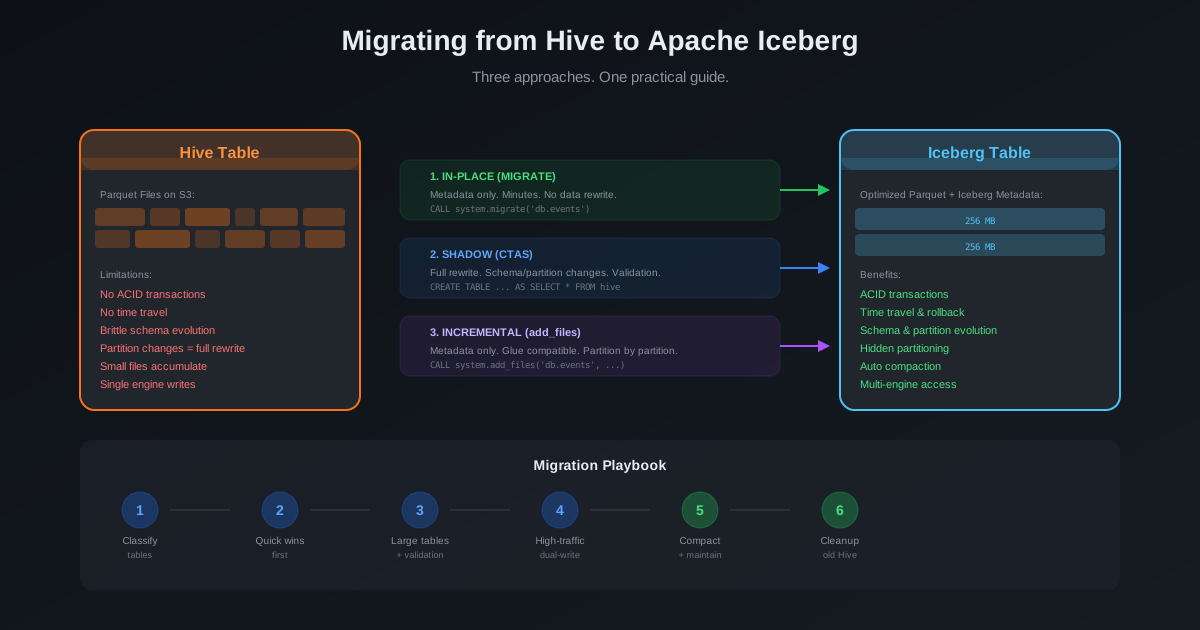
If you are reading this, you probably fall into one of two camps. Either your Hive tables are already on cloud object storage (S3, GCS, ADLS) and you want to convert them to Iceberg format. Or — and this is the harder problem — your Hive tables are sitting on an on-premises Hadoop cluster with HDFS, and you need to move everything to a cloud-based lakehouse with Iceberg.
This guide covers both scenarios. We start with the harder one — migrating from on-prem Hadoop HDFS to a cloud data lake with Iceberg — because that is where most teams get stuck. Then we cover the table format conversion for data already on cloud storage. Both paths converge at the same destination: a modern, open lakehouse built on Apache Iceberg.
Part 1: On-Prem Hadoop to Cloud — Moving the Data
If your Hive tables live on HDFS in an on-premises Hadoop cluster, the migration has two distinct stages:
- Move the data from HDFS to cloud object storage (S3)
- Convert the tables from Hive format to Iceberg format
Many guides skip stage 1 entirely, assuming your data is already on S3. In reality, getting petabytes of data from an on-prem data center to the cloud — reliably, without disrupting production workloads — is often the hardest part of the entire migration.
Assessing What You Have
Before moving a single byte, build a complete inventory of your on-prem landscape:
Data volume and distribution. How much total data? How is it distributed across tables? Typically, a small number of tables hold the majority of the data — focus on those first for capacity planning.
Total HDFS capacity:        500 TB
Used:                       320 TB
Tables > 10 TB:             8 tables (180 TB combined)
Tables 1-10 TB:             35 tables (95 TB combined)
Tables < 1 TB:              200+ tables (45 TB combined)
Partition structure. How are tables partitioned? Daily? Monthly? Hourly? The partition granularity determines your migration unit — you will be migrating partition by partition.
Data formats. Parquet, ORC, Avro, CSV, JSON? Parquet and ORC can be migrated without rewriting in some scenarios. CSV and JSON always require a rewrite.
Active vs. cold data. How much data is actively queried versus archived? Cold data can be migrated during off-hours with lower priority. Active data needs careful coordination.
Write patterns. Which tables are written to daily? Hourly? Continuously? This determines your cutover strategy.
Network Planning: The Bottleneck Nobody Plans For
The first constraint most teams hit is network bandwidth. Moving hundreds of terabytes over the internet is not viable. You need dedicated connectivity.
Calculate your transfer time:
Data volume:           320 TB
Available bandwidth:   1 Gbps Direct Connect
Effective throughput:  ~80% utilization = 800 Mbps
Transfer time:         320 TB / (800 Mbps / 8) = 320,000 GB / 100 MB/s
                     = 3,200,000 seconds
                     = ~37 days of continuous transfer
At 1 Gbps, 320 TB takes over a month of continuous transfer. At 10 Gbps, it drops to about 4 days. Plan your bandwidth accordingly.
| Data Volume | 1 Gbps Direct Connect | 10 Gbps Direct Connect | AWS Snowball Edge |
|---|---|---|---|
| 10 TB | ~1 day | ~3 hours | Overkill |
| 100 TB | ~12 days | ~1.5 days | 2-3 devices, ~1 week with shipping |
| 500 TB | ~60 days | ~6 days | 5-10 devices, ~2 weeks with shipping |
| 1 PB+ | ~120 days | ~12 days | 10+ devices, consider Snowmobile |
Options for connectivity:
- AWS Direct Connect: Dedicated network connection from your data center to AWS. Available in 1 Gbps and 10 Gbps. This is the recommended approach for ongoing hybrid operations.
- AWS PrivateLink for S3: Enables private connectivity to S3 without traversing the public internet.
- AWS Snowball Edge: Physical devices shipped to your data center for offline bulk transfer. Best for one-time migrations where network bandwidth is limited.
Choosing the Right Data Transfer Tool
| Tool | Best For | How It Works |
|---|---|---|
| DistCp | Push from on-prem Hadoop cluster | Uses MapReduce on your source cluster to copy files to S3 |
| S3DistCp | Pull from EMR cluster in AWS | Runs on an EMR cluster and pulls data from HDFS via Direct Connect. Minimizes load on source cluster. |
| AWS DataSync | Managed, scheduled transfers | Deploys an agent in your data center. Handles scheduling, throttling, and verification. |
| AWS Snowball Edge | Offline bulk transfer | Physical devices for network-limited environments |
Our recommendation: Use S3DistCp (pull model) for the bulk migration. It runs on an EMR cluster in AWS, which means it does not consume CPU and RAM on your source Hadoop cluster — the source nodes only serve HDFS block reads. This is critical if your on-prem cluster is still running production workloads during the migration.
For ongoing incremental syncs after the bulk migration, AWS DataSync is ideal — it automatically detects changed files and transfers only the deltas.
The Dual-Catalog Approach: Spark on Source Cluster Writing Directly to Cloud
There is a fifth option that many teams overlook — and it is often the most elegant. Instead of using file-copy tools like DistCp or DataSync, you can use your existing on-prem Spark cluster to read from the local Hive Metastore and write directly to a cloud-based Iceberg catalog. No intermediate file copy. No staging area. Spark handles the read, transformation, and write in a single job.
The trick is configuring two Spark catalogs in the same session: one pointing to your on-prem Hive Metastore (HMS), and another pointing to your cloud catalog (Polaris, AWS Glue, or any Iceberg REST catalog).
Setting Up Dual Catalogs
from pyspark.sql import SparkSession

spark = SparkSession.builder \
    .appName("hive-to-iceberg-migration") \
    \
    # Source catalog: on-prem Hive Metastore
    .config("spark.sql.catalog.hive_source", "org.apache.iceberg.spark.SparkCatalog") \
    .config("spark.sql.catalog.hive_source.type", "hive") \
    .config("spark.sql.catalog.hive_source.uri", "thrift://hive-metastore:9083") \
    \
    # Target catalog: cloud Iceberg catalog (Polaris REST example)
    .config("spark.sql.catalog.cloud_iceberg", "org.apache.iceberg.spark.SparkCatalog") \
    .config("spark.sql.catalog.cloud_iceberg.type", "rest") \
    .config("spark.sql.catalog.cloud_iceberg.uri", "https://polaris.your-cloud.com/api/v1") \
    .config("spark.sql.catalog.cloud_iceberg.warehouse", "s3://your-lakehouse-bucket/warehouse") \
    .config("spark.sql.catalog.cloud_iceberg.credential", "client-id:client-secret") \
    \
    # S3 access from on-prem (via Direct Connect)
    .config("spark.hadoop.fs.s3a.endpoint", "s3.amazonaws.com") \
    .config("spark.hadoop.fs.s3a.access.key", "YOUR_ACCESS_KEY") \
    .config("spark.hadoop.fs.s3a.secret.key", "YOUR_SECRET_KEY") \
    \
    .getOrCreate()
For AWS Glue as the target catalog:
# Target catalog: AWS Glue
.config("spark.sql.catalog.cloud_iceberg", "org.apache.iceberg.spark.SparkCatalog") \
.config("spark.sql.catalog.cloud_iceberg.catalog-impl", "org.apache.iceberg.aws.glue.GlueCatalog") \
.config("spark.sql.catalog.cloud_iceberg.warehouse", "s3://your-lakehouse-bucket/warehouse") \
.config("spark.sql.catalog.cloud_iceberg.io-impl", "org.apache.iceberg.aws.s3.S3FileIO") \
Migration Patterns with Dual Catalogs
Once both catalogs are configured, you can use standard Spark SQL to move data across systems:
CTAS — Full table migration with schema and partition changes:
-- Read from on-prem Hive, write to cloud Iceberg
CREATE TABLE cloud_iceberg.analytics.events
USING iceberg
PARTITIONED BY (day(event_timestamp))
TBLPROPERTIES (
  'write.distribution-mode' = 'hash',
  'write.target-file-size-bytes' = '268435456',
  'write.parquet.compression-codec' = 'zstd'
)
AS SELECT * FROM hive_source.warehouse.events;
INSERT INTO — Append specific partitions incrementally:
-- Migrate one partition at a time
INSERT INTO cloud_iceberg.analytics.events
SELECT * FROM hive_source.warehouse.events
WHERE event_date = '2026-01-15';
INSERT OVERWRITE — Overwrite specific partitions (idempotent, safe to retry):
-- Idempotent partition migration — safe to re-run on failure
INSERT OVERWRITE cloud_iceberg.analytics.events
SELECT * FROM hive_source.warehouse.events
WHERE event_date = '2026-01-15';
INSERT OVERWRITE is particularly valuable for migrations because it is idempotent — if a job fails and you re-run it, the partition is overwritten cleanly. No duplicate data. No need to manually clean up partial writes.
Partition-by-Partition Loop with Dual Catalogs
Combine dual catalogs with the partition-by-partition strategy for a robust migration pipeline:
# Get all partitions from the source
partitions = spark.sql("""
    SELECT DISTINCT event_date
    FROM hive_source.warehouse.events
    ORDER BY event_date
""").collect()

for row in partitions:
    partition_date = row.event_date
    try:
        # Update state table
        spark.sql(f"""
            UPDATE migration_control.partition_state
            SET status = 'in_progress', started_at = current_timestamp()
            WHERE table_name = 'events'
            AND partition_value = '{partition_date}'
        """)

        # Migrate partition (idempotent)
        spark.sql(f"""
            INSERT OVERWRITE cloud_iceberg.analytics.events
            SELECT * FROM hive_source.warehouse.events
            WHERE event_date = '{partition_date}'
        """)

        # Validate row count
        source_count = spark.sql(f"""
            SELECT COUNT(*) AS cnt
            FROM hive_source.warehouse.events
            WHERE event_date = '{partition_date}'
        """).collect()[0].cnt

        target_count = spark.sql(f"""
            SELECT COUNT(*) AS cnt
            FROM cloud_iceberg.analytics.events
            WHERE event_date = '{partition_date}'
        """).collect()[0].cnt

        if source_count == target_count:
            spark.sql(f"""
                UPDATE migration_control.partition_state
                SET status = 'validated',
                    hdfs_row_count = {source_count},
                    s3_row_count = {target_count},
                    checksum_match = TRUE,
                    completed_at = current_timestamp()
                WHERE table_name = 'events'
                AND partition_value = '{partition_date}'
            """)
        else:
            raise Exception(
                f"Row count mismatch: source={source_count}, target={target_count}"
            )

    except Exception as e:
        spark.sql(f"""
            UPDATE migration_control.partition_state
            SET status = 'failed',
                error_message = '{str(e)[:500]}',
                retry_count = retry_count + 1
            WHERE table_name = 'events'
            AND partition_value = '{partition_date}'
        """)
Why This Approach Is Often the Best Choice
| Advantage | Explanation |
|---|---|
| No intermediate staging | Data flows directly from HDFS to S3 in Iceberg format. No landing zone, no extra copies. |
| Schema transformation on the fly | You can cast types, rename columns, add columns, and repartition during the migration itself. |
| Iceberg-native from the start | Data lands as optimized Iceberg files with proper metadata, statistics, and partition specs — no post-migration MIGRATE or add_files step needed. |
| Built-in file optimization | Spark respects Iceberg's write.target-file-size-bytes and write.distribution-mode, so files are properly sized on arrival. |
| Familiar tooling | Your team already knows Spark SQL. No new tools to learn or deploy. |
| INSERT OVERWRITE is idempotent | Failed partitions can be safely retried without cleanup — the overwrite replaces any partial data. |
When NOT to Use Dual Catalogs
- Source cluster has no spare capacity. Reading and writing from the same cluster adds compute load. If your on-prem cluster is already at capacity, use the S3DistCp pull model instead.
- Network bandwidth is the bottleneck, not compute. The dual-catalog approach still transfers data over the network. If you are bandwidth-constrained, the data transfer tools with throttling give you more control.
- Petabyte-scale tables with simple schemas. For very large tables that do not need schema changes, file-level copy tools (DistCp, DataSync) can be faster because they skip the Spark read-write overhead.
Choosing Your Migration Path
With all the options on the table, here is a decision guide:
Do you need schema or partition changes?
  ├── Yes → Dual-catalog CTAS/INSERT OVERWRITE (best)
  │         or Shadow CTAS from cloud Spark
  └── No
      ├── Is source cluster at capacity?
      │   ├── Yes → S3DistCp (pull from cloud EMR) + add_files
      │   └── No  → Dual-catalog INSERT OVERWRITE (simplest)
      └── Is bandwidth severely limited?
          ├── Yes → AWS Snowball Edge + add_files
          └── No  → S3DistCp or DataSync + add_files
Partition-by-Partition Migration Strategy
Migrating an entire table at once is risky and hard to resume if something fails. The reliable approach is to migrate partition by partition, with state tracking to manage progress.
Why Partition-by-Partition?
- Resumability. If the migration fails at partition 847 of 2,000, you restart from partition 847 — not from the beginning.
- Parallelism. You can run multiple migration jobs concurrently, each handling a different set of partitions.
- Throttling. You can control the rate — migrate 50 partitions per hour during business hours, 200 per hour overnight.
- Validation. You can validate each partition as it lands, catching issues early rather than at the end.
- Incremental progress. Stakeholders can see progress — "72% of partitions migrated" is more useful than "running."
The Migration State Table
Create a control table that tracks the state of every partition across every table being migrated:
CREATE TABLE migration_control.partition_state (
  table_name        STRING,
  partition_key     STRING,
  partition_value   STRING,
  hdfs_path         STRING,
  s3_path           STRING,
  status            STRING,    -- pending | in_progress | copied | validated | failed
  hdfs_row_count    BIGINT,
  s3_row_count      BIGINT,
  hdfs_file_count   INT,
  s3_file_count     INT,
  hdfs_size_bytes   BIGINT,
  s3_size_bytes     BIGINT,
  checksum_match    BOOLEAN,
  started_at        TIMESTAMP,
  completed_at      TIMESTAMP,
  error_message     STRING,
  retry_count       INT
) USING iceberg;
This table is your single source of truth for the entire migration. Every operation — copy, validate, retry — updates it.
Populating the State Table
Before starting any data transfer, scan the Hive metastore and populate the state table with every partition:
from pyspark.sql import SparkSession

spark = SparkSession.builder.getOrCreate()

# Get all partitions for a table from Hive metastore
partitions = spark.sql("""
    SHOW PARTITIONS hive_catalog.db.events
""").collect()

# Build state records
state_records = []
for p in partitions:
    partition_spec = p[0]  # e.g., "event_date=2026-01-15"
    key, value = partition_spec.split("=")
    hdfs_path = f"/warehouse/db/events/{partition_spec}"
    s3_path = f"s3://datalake-bucket/db/events/{partition_spec}"

    state_records.append({
        "table_name": "db.events",
        "partition_key": key,
        "partition_value": value,
        "hdfs_path": hdfs_path,
        "s3_path": s3_path,
        "status": "pending",
        "retry_count": 0
    })

# Insert into state table
spark.createDataFrame(state_records).writeTo(
    "migration_control.partition_state"
).append()
The Migration Loop
Each migration worker picks up pending partitions, copies them, and updates the state:
import subprocess

def migrate_partition(table_name, partition_value, hdfs_path, s3_path):
    """Migrate a single partition from HDFS to S3."""

    # Mark as in_progress
    spark.sql(f"""
        UPDATE migration_control.partition_state
        SET status = 'in_progress', started_at = current_timestamp()
        WHERE table_name = '{table_name}'
        AND partition_value = '{partition_value}'
    """)

    try:
        # Get HDFS metrics before copy
        hdfs_stats = spark.sql(f"""
            SELECT COUNT(*) as row_count
            FROM hive_catalog.{table_name}
            WHERE {get_partition_filter(partition_value)}
        """).collect()[0]

        # Execute S3DistCp (or DistCp) for this partition
        result = subprocess.run([
            "s3-dist-cp",
            "--src", f"hdfs://{hdfs_path}",
            "--dest", s3_path,
            "--srcPattern", ".*\\.parquet$"
        ], capture_output=True, timeout=3600)

        if result.returncode != 0:
            raise Exception(f"S3DistCp failed: {result.stderr}")

        # Mark as copied
        spark.sql(f"""
            UPDATE migration_control.partition_state
            SET status = 'copied',
                hdfs_row_count = {hdfs_stats.row_count},
                completed_at = current_timestamp()
            WHERE table_name = '{table_name}'
            AND partition_value = '{partition_value}'
        """)

    except Exception as e:
        spark.sql(f"""
            UPDATE migration_control.partition_state
            SET status = 'failed',
                error_message = '{str(e)[:500]}',
                retry_count = retry_count + 1
            WHERE table_name = '{table_name}'
            AND partition_value = '{partition_value}'
        """)
Parallel Workers Without Conflicts
The key challenge with parallel migration is ensuring two workers do not pick up the same partition. Insider Engineering solved this using Redis — storing pending partitions in a Redis Set and having each worker atomically pop partitions from the set.
An alternative approach using the state table itself:
-- Worker picks up a batch of pending partitions (atomic claim)
UPDATE migration_control.partition_state
SET status = 'in_progress',
    started_at = current_timestamp()
WHERE table_name = 'db.events'
AND status = 'pending'
AND partition_value IN (
    SELECT partition_value
    FROM migration_control.partition_state
    WHERE table_name = 'db.events'
    AND status = 'pending'
    ORDER BY partition_value
    LIMIT 20
);
Because Iceberg supports ACID transactions, this update is atomic — no two workers will claim the same partition.
Monitoring Progress
Query the state table for real-time migration progress:
-- Overall progress per table
SELECT
  table_name,
  COUNT(*) AS total_partitions,
  SUM(CASE WHEN status = 'validated' THEN 1 ELSE 0 END) AS validated,
  SUM(CASE WHEN status = 'copied' THEN 1 ELSE 0 END) AS copied,
  SUM(CASE WHEN status = 'in_progress' THEN 1 ELSE 0 END) AS in_progress,
  SUM(CASE WHEN status = 'pending' THEN 1 ELSE 0 END) AS pending,
  SUM(CASE WHEN status = 'failed' THEN 1 ELSE 0 END) AS failed,
  ROUND(100.0 * SUM(CASE WHEN status IN ('validated', 'copied') THEN 1 ELSE 0 END)
    / COUNT(*), 1) AS pct_complete
FROM migration_control.partition_state
GROUP BY table_name
ORDER BY pct_complete;
Build a dashboard (Grafana, Superset, or even a simple scheduled query) that surfaces this data. Stakeholders care about progress visibility — "328 of 2,041 partitions migrated (16%)" is far more reassuring than silence.
Scheduling: When to Migrate What
Do not try to migrate everything at once. Create a migration schedule that balances speed with safety:
Phase 1: Pilot (Week 1-2)
- Migrate 2-3 small, non-critical tables end-to-end
- Validate the tooling, permissions, network throughput, and data integrity
- Measure actual throughput vs. your estimates
Phase 2: Cold Data (Week 2-4)
- Migrate historical partitions that are rarely queried (> 6 months old)
- Run at full throughput during off-hours, throttle during business hours
- AWS DataSync supports built-in bandwidth throttling — set lower limits during peak hours
Phase 3: Warm Data (Week 4-6)
- Migrate recent partitions (last 1-6 months)
- These are queried more frequently — validate promptly after copy
- Start building the parallel-run infrastructure (covered below)
Phase 4: Hot Data + Cutover (Week 6-8)
- Migrate the most recent partitions
- Switch pipelines to write to S3/Iceberg
- Backfill any data written to HDFS during the transition
- Begin the parallel-run period
Bandwidth throttling example with DataSync:
Business hours (8 AM - 6 PM):   Throttle to 200 Mbps
Off-hours (6 PM - 8 AM):        Full throughput (1 Gbps)
Weekends:                       Full throughput (1 Gbps)
This ensures your production Hadoop workloads have sufficient network bandwidth during the day while maximizing migration throughput overnight and on weekends.
Data Validation: Catching Issues Before They Become Problems
Every migrated partition must be validated before it is marked as complete. Validation happens at three levels:
Level 1: File Metrics
-- Compare file counts and sizes per partition
UPDATE migration_control.partition_state
SET s3_file_count = (
      SELECT COUNT(*) FROM s3_file_listing
      WHERE path LIKE CONCAT(s3_path, '%')
    ),
    s3_size_bytes = (
      SELECT SUM(size) FROM s3_file_listing
      WHERE path LIKE CONCAT(s3_path, '%')
    )
WHERE status = 'copied';

-- Flag partitions where file counts do not match
SELECT * FROM migration_control.partition_state
WHERE status = 'copied'
AND hdfs_file_count != s3_file_count;
Level 2: Row Counts
-- Compare row counts between source and destination
-- Run this for each copied partition
SELECT
  p.table_name,
  p.partition_value,
  p.hdfs_row_count,
  (SELECT COUNT(*)
   FROM iceberg_catalog.db.events
   WHERE event_date = p.partition_value) AS s3_row_count
FROM migration_control.partition_state p
WHERE p.status = 'copied'
AND p.table_name = 'db.events';
Level 3: Checksum Validation
For critical tables, go beyond row counts and validate actual data content:
-- Hash-based validation on key columns
SELECT
  'hdfs' AS source,
  SUM(HASH(event_id, user_id, event_type, amount)) AS checksum
FROM hive_catalog.db.events
WHERE event_date = '2026-01-15'

UNION ALL

SELECT
  's3' AS source,
  SUM(HASH(event_id, user_id, event_type, amount)) AS checksum
FROM iceberg_catalog.db.events
WHERE event_date = '2026-01-15';
If checksums match, mark the partition as validated:
UPDATE migration_control.partition_state
SET status = 'validated',
    checksum_match = TRUE
WHERE table_name = 'db.events'
AND partition_value = '2026-01-15'
AND s3_row_count = hdfs_row_count;
Handling Failures and Retries
S3DistCp does not clean up partially copied files if it fails mid-transfer. Your retry logic must account for this:
def retry_failed_partition(table_name, partition_value, s3_path):
    # Step 1: Clean up partial files from previous attempt
    subprocess.run([
        "aws", "s3", "rm", s3_path, "--recursive"
    ])

    # Step 2: Re-copy from HDFS
    migrate_partition(table_name, partition_value, hdfs_path, s3_path)
Set a maximum retry count (3 is usually sufficient). Partitions that fail 3 times need manual investigation — they typically indicate a corrupt source file, a permissions issue, or a network problem.
-- Find partitions that have exhausted retries
SELECT * FROM migration_control.partition_state
WHERE status = 'failed'
AND retry_count >= 3;
Part 2: Running Two Systems in Parallel
The most anxiety-inducing part of any migration is the cutover. You cannot flip a switch overnight and hope everything works. You need a period where both systems run in parallel — the on-prem Hive cluster and the cloud Iceberg lakehouse — with gradual traffic shifting.
The Five Phases of Parallel Operation
Phase 1: Hive-Only         ████████████████████  (Hive: R/W, Iceberg: -)
Phase 2: Copy in Progress  ████████████████░░░░  (Hive: R/W, Iceberg: sync)
Phase 3: Dual-Write        ████████████░░░░░░░░  (Hive: R/W, Iceberg: W)
Phase 4: Dual-Read         ████████░░░░░░░░░░░░  (Hive: W, Iceberg: R/W)
Phase 5: Iceberg-Only      ░░░░░░░░░░░░░░░░░░░░  (Hive: -, Iceberg: R/W)
Phase 1: Hive-Only (Status Quo)
Everything runs on the on-prem Hadoop cluster. This is where you are today. During this phase:
- Inventory all tables, partitions, and dependencies
- Set up the cloud infrastructure (S3 buckets, Polaris catalog, Spark clusters)
- Establish Direct Connect
- Run the pilot migration
Phase 2: Bulk Data Copy
Historical data is being copied partition by partition from HDFS to S3. During this phase:
- All reads and writes still go to the Hive cluster
- Migration workers are transferring partitions in the background
- The state table tracks progress
- Validation runs on completed partitions
Key rule: Do not change anything about production during this phase. The Hive cluster continues to operate normally.
Phase 3: Dual-Write
Once the bulk historical data is on S3 and validated, start writing to both systems:
# Pipeline writes to both Hive and Iceberg
def write_daily_batch(df, partition_date):
    # Write to Hive (existing)
    df.write \
      .mode("overwrite") \
      .partitionBy("event_date") \
      .saveAsTable("hive_catalog.db.events")

    # Write to Iceberg (new)
    df.writeTo("iceberg_catalog.db.events") \
      .overwritePartitions()
Dual-write duration: Keep this as short as possible. Every day of dual-write doubles your compute cost for those pipelines. For daily batch jobs, 1-2 weeks is typical. For hourly jobs, 3-5 days may suffice.
Reconciliation during dual-write: Run daily validation to ensure both systems have the same data:
-- Daily reconciliation query
SELECT
  event_date,
  'hive' AS source,
  COUNT(*) AS row_count,
  SUM(amount) AS total_amount
FROM hive_catalog.db.events
WHERE event_date >= current_date() - INTERVAL 7 DAYS
GROUP BY event_date

UNION ALL

SELECT
  event_date,
  'iceberg' AS source,
  COUNT(*) AS row_count,
  SUM(amount) AS total_amount
FROM iceberg_catalog.db.events
WHERE event_date >= current_date() - INTERVAL 7 DAYS
GROUP BY event_date
ORDER BY event_date, source;
If row counts or totals diverge, investigate immediately — do not let discrepancies accumulate.
Phase 4: Dual-Read (Validation Period)
Switch read traffic to the Iceberg tables while continuing to write to both systems:
- Update dashboards and reports to read from Iceberg
- Update ML pipelines to read features from Iceberg
- Update ad-hoc query tools to point to the Iceberg catalog
- Keep writing to both systems as a safety net
Compare query results: For critical reports, run the same query against both systems and compare outputs. If results match, you have confirmed data consistency.
Duration: 1-2 weeks is typically enough to build confidence. If any discrepancies appear, you can instantly switch readers back to Hive.
Phase 5: Iceberg-Only (Cutover)
Once validation passes:
- Stop writes to Hive. Update all pipelines to write only to Iceberg.
- Keep Hive cluster running for 2-4 more weeks as a safety net.
- Final validation. Run a comprehensive reconciliation across all migrated tables.
- Decommission. Power down the Hadoop cluster. Celebrate.
Post-cutover safety: Before decommissioning, ensure:
- All migrated data is validated (checksums, row counts, sample queries)
- All downstream consumers are reading from Iceberg
- No hidden dependencies on the Hive metastore remain
- Data retention requirements are met on the cloud side
Part 3: Converting Hive Tables to Iceberg Format
Once your data is on S3 (either from an on-prem migration or because it was already there), converting from Hive format to Iceberg format is the straightforward part.
Approach 1: In-Place Migration (MIGRATE Procedure)
The fastest approach. Iceberg's MIGRATE procedure creates Iceberg metadata on top of your existing data files — no data is copied or rewritten.
CALL spark_catalog.system.migrate('db.events');
What happens behind the scenes:
- Iceberg reads the Hive table's metadata (schema, partitions, file locations)
- Creates Iceberg metadata files (manifest lists, manifests) that point to the existing Parquet files
- Renames the original Hive table (as a backup)
- Creates a new Iceberg table with the same name, pointing to the same data files
When to use it:
- Data is already in Parquet, ORC, or Avro
- No schema or partition changes needed
- You are using Hive Metastore (not AWS Glue Data Catalog)
When NOT to use it:
- You need schema or partition changes (use CTAS)
- You are using AWS Glue Data Catalog (Glue does not support RENAME TABLE)
Approach 2: Shadow Migration (CTAS)
Create a new Iceberg table and copy the data. Rewrites all data but gives you full control over schema and partitioning.
CREATE TABLE iceberg_catalog.db.events
USING iceberg
PARTITIONED BY (day(event_timestamp))
TBLPROPERTIES (
  'write.distribution-mode' = 'hash',
  'write.target-file-size-bytes' = '268435456',
  'write.parquet.compression-codec' = 'zstd'
)
AS SELECT
  event_id,
  user_id,
  event_type,
  CAST(event_data AS STRING) AS payload,
  event_timestamp,
  CAST(NULL AS STRING) AS user_country
FROM hive_catalog.db.events;
When to use it:
- You want to change schema, partition layout, or file format
- You want to validate before switching production traffic
- You need AWS Glue compatibility
- You want optimized file sizes from the start
Approach 3: Incremental Migration (add_files)
Create an empty Iceberg table, then add existing data files partition by partition.
CREATE TABLE iceberg_catalog.db.events (
  event_id STRING,
  user_id STRING,
  event_type STRING,
  event_timestamp TIMESTAMP
) USING iceberg
PARTITIONED BY (day(event_timestamp));

CALL iceberg_catalog.system.add_files(
  table => 'db.events',
  source_table => 'hive_catalog.db.events',
  partition_filter => map('event_date', '2026-01-15')
);
When to use it:
- You want in-place speed but need AWS Glue compatibility
- You want to migrate specific partitions incrementally
- You need to merge files from multiple source tables
Side-by-Side Comparison
| Factor | In-Place (MIGRATE) | Shadow (CTAS) | Incremental (add_files) |
|---|---|---|---|
| Data rewrite | No | Yes (full copy) | No |
| Migration speed | Minutes | Hours to days | Minutes per partition |
| Schema changes | No | Yes | No |
| Partition changes | No | Yes | No |
| AWS Glue support | No | Yes | Yes |
| Validation before switch | No | Yes (separate table) | Partial |
| Rollback | Rename backup back | Keep original, drop new | Drop Iceberg table |
| Compute cost | Minimal | High | Minimal |
Common Pitfalls
1. Network Saturation During On-Prem Migration
Problem: The migration saturates your Direct Connect link, impacting production VPN traffic and cloud workloads.
Solution: Use bandwidth throttling. AWS DataSync supports hourly schedules with different throughput limits. S3DistCp can be throttled via mapreduce.map.bandwidth.mb. Always reserve 20-30% bandwidth for non-migration traffic.
2. Write Conflicts During Migration
Problem: A pipeline writes to the Hive table during migration, and the new files are not reflected in the Iceberg metadata.
Solution: Schedule migrations during write-quiet windows. For batch tables, migrate immediately after the daily batch completes. For streaming tables, use the dual-write approach described above.
3. Partition Type Mismatches
Problem: Hive stores partition values as strings in the metastore, even for INT or DATE columns. Iceberg uses actual column types. This causes type mismatch errors.
Solution: Use CTAS with explicit casts:
CREATE TABLE iceberg_catalog.db.events
USING iceberg
PARTITIONED BY (event_date)
AS SELECT
  event_id,
  user_id,
  CAST(event_date AS DATE) AS event_date
FROM hive_catalog.db.events;
4. Small Files Inherited from Hive
Problem: Hive tables with thousands of small files migrate those small files as-is. The performance problem transfers to Iceberg.
Solution: Run compaction immediately after in-place migration:
CALL spark_catalog.system.migrate('db.events');
CALL iceberg_catalog.system.rewrite_data_files('db.events');
Or use CTAS, which writes optimally-sized files by default.
5. Missing Statistics After In-Place Migration
Problem: In-place migration does not compute Iceberg's column-level statistics. Min/max pruning — one of Iceberg's key performance features — will not work until statistics exist.
Solution: Rewrite manifests or run compaction after migration:
CALL iceberg_catalog.system.rewrite_manifests('db.events');
6. Stale State After Partial Failures
Problem: S3DistCp does not clean up partially copied files on failure. Retrying without cleanup can result in duplicate or corrupt files.
Solution: Always delete the target partition path before retrying a failed copy. Build this into your retry logic. Track retry counts in your state table and escalate partitions that fail 3+ times for manual investigation.
7. The Glue Catalog RENAME Problem
Problem: The MIGRATE procedure renames the original Hive table as a backup. AWS Glue Data Catalog does not support RENAME TABLE.
Solution: Use add_files or CTAS when working with Glue.
8. Time Zone Mismatches Between Systems
Problem: On-prem Hadoop cluster uses UTC, but cloud Spark clusters default to a different timezone. Timestamp-partitioned tables can silently misalign by one day.
Solution: Explicitly set timezone in all Spark configurations:
spark.conf.set("spark.sql.session.timeZone", "UTC")
Validate timestamp partition boundaries after migration — off-by-one day errors are the most common timezone issue.
Migration Checklist
Per-Table Checklist
- Classify the table (quick win, needs rework, large/stable, high-traffic)
- Choose the migration approach (MIGRATE, CTAS, add_files)
- Verify source file format is Parquet, ORC, or Avro
- Check catalog compatibility (HMS vs Glue)
- Populate state table with all partitions
- Schedule migration during write-quiet windows
- Execute partition-by-partition migration
- Validate: file counts match
- Validate: row counts match per partition
- Validate: checksum on key columns for critical tables
- Run compaction if using in-place migration
- Update downstream pipeline catalog references
- Run downstream queries to verify correctness
- Set up ongoing table maintenance (compaction, snapshot expiry)
- Run parallel-read validation for 1-2 weeks
- Remove old Hive table after validation period (keep backup 7-30 days)
Overall Migration Checklist
- Complete data inventory (tables, partitions, sizes, formats)
- Establish Direct Connect or other network connectivity
- Run pilot migration (2-3 small tables)
- Measure actual throughput and validate estimates
- Create migration state tracking table
- Migrate cold data (off-hours, full throughput)
- Migrate warm data (throttled during business hours)
- Begin dual-write for hot tables
- Validate dual-write consistency daily
- Switch read traffic to Iceberg
- Run dual-read validation for 1-2 weeks
- Stop writes to Hive
- Final comprehensive reconciliation
- Decommission Hadoop cluster (after 2-4 week safety period)
Migrating from on-prem Hadoop to a cloud lakehouse? Cazpian provides a fully managed Spark and Iceberg platform with Apache Polaris catalog, zero cold-start compute, and built-in table maintenance — all running in your AWS account. We have helped teams migrate petabyte-scale data lakes. Learn more.