Schema Evolution in Apache Iceberg: The Feature That Saves Data Teams Thousands of Hours

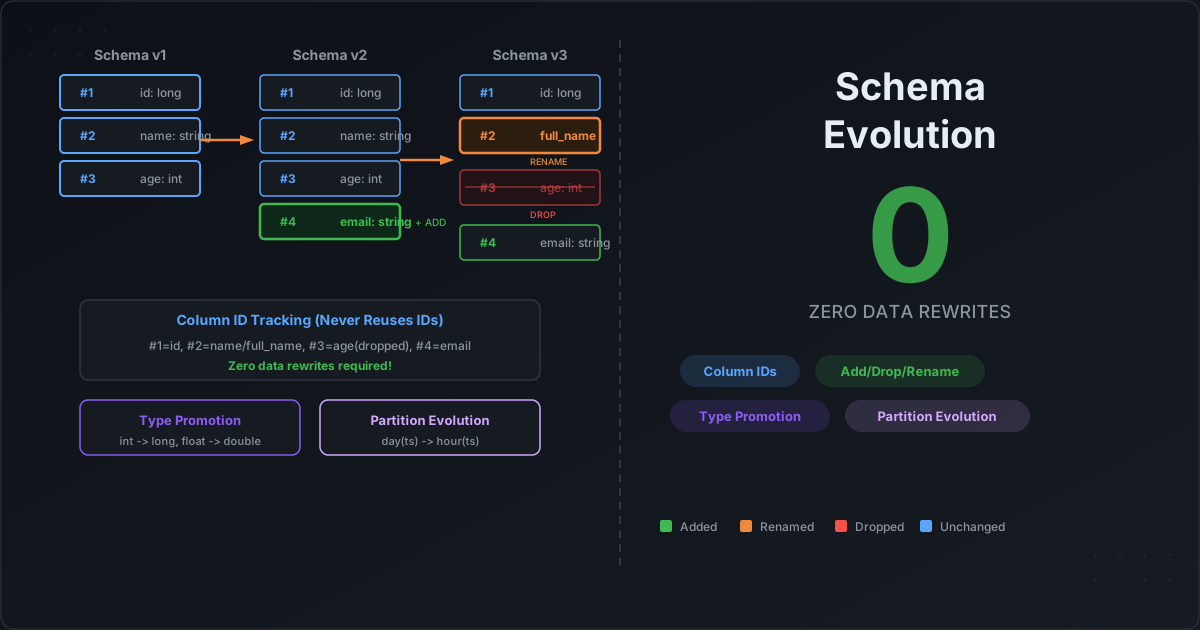
Every data engineer has lived this nightmare: a product team needs a new field in the events table. In a traditional data warehouse, this means a migration ticket, a maintenance window, potentially hours of data rewriting, and a prayer that no downstream pipeline breaks. In a Hive-based data lake, it is even worse — you add the column, but old Parquet files do not have it, partition metadata gets confused, and three different teams spend a week debugging null values.
Apache Iceberg eliminates this entire class of problems. Schema evolution in Iceberg is a metadata-only operation. No data rewrites. No downtime. No broken queries. And the mechanism that makes this possible is both simple and elegant.
How Iceberg Tracks Schema: Column IDs, Not Column Names
The key insight behind Iceberg's schema evolution is that it identifies columns by unique integer IDs, not by names or positions.

In traditional Hive/Parquet tables, columns are matched by position. The first column in the schema maps to the first column in the Parquet file, the second to the second, and so on. This is fragile. If you add a column in the middle, rename a column, or reorder columns, the positional mapping breaks — and so does every query.
Iceberg assigns a unique ID to every column when it is first created. That ID is stored in both the table metadata and the Parquet file metadata. When Iceberg reads a data file, it matches columns by ID, not by name or position. This means:
- Renaming a column changes the name in the metadata but the ID stays the same — existing data files still map correctly
- Reordering columns changes the schema order but the IDs are unchanged — no file rewrites needed
- Adding a column assigns a new ID that does not exist in old data files — those files simply return
nullfor the new column - Dropping a column removes the ID from the active schema — old data files still have the data, but it is never read
This ID-based tracking is what makes every schema evolution operation safe and independent.
The Four Schema Evolution Operations
1. Add Columns
Adding a column is the most common schema change. In Iceberg, it is a metadata-only operation that takes milliseconds, regardless of table size.
-- Add a simple column
ALTER TABLE catalog.db.orders ADD COLUMN shipment_date DATE;

-- Add a column with a comment
ALTER TABLE catalog.db.orders ADD COLUMN priority STRING COMMENT 'Order priority level';

-- Add a column at a specific position
ALTER TABLE catalog.db.orders ADD COLUMN order_source STRING AFTER order_id;

-- Add a column as the first column
ALTER TABLE catalog.db.orders ADD COLUMN record_version INT FIRST;
What happens to existing data? Nothing. Old data files do not have the new column, so Iceberg returns null for it when reading those files. New data files written after the change include the column. Both old and new files coexist seamlessly.
Nested column support is where Iceberg really shines compared to Hive:
-- Add a struct column
ALTER TABLE catalog.db.orders ADD COLUMN
  shipping_address STRUCT<street: STRING, city: STRING, zip: STRING>;

-- Add a field to an existing struct
ALTER TABLE catalog.db.orders ADD COLUMN
  shipping_address.country STRING;

-- Add a column inside an array of structs
ALTER TABLE catalog.db.orders ADD COLUMN
  line_items.discount_pct DOUBLE;
Every nested field gets its own unique ID, so adding a field to a struct is just as safe as adding a top-level column.
2. Rename Columns
Renaming a column updates the metadata mapping without touching data files.
-- Rename a top-level column
ALTER TABLE catalog.db.orders RENAME COLUMN ship_date TO shipment_date;

-- Rename a nested field
ALTER TABLE catalog.db.orders RENAME COLUMN
  shipping_address.zip TO postal_code;
Why this does not break anything: The column's unique ID stays the same. Any Parquet file that references ID 7 will still map to the correct column, regardless of what it is named in the current schema. Downstream queries using the old name will fail (you need to update them), but the data itself is never corrupted or misread.
Contrast with Hive: In Hive, renaming a column in a Parquet-backed table can silently map to the wrong data column because Hive uses positional matching. You have to choose between hive.columns.comments and risk mismatches, or rewrite all data files. Iceberg has no such ambiguity.
3. Drop Columns
Dropping a column removes it from the active schema. The data still exists in old files but is never read.
-- Drop a column
ALTER TABLE catalog.db.orders DROP COLUMN legacy_status_code;

-- Drop a nested field
ALTER TABLE catalog.db.orders DROP COLUMN shipping_address.apt_number;
Important detail: Iceberg never reuses column IDs. When you drop column ID 12 and later add a new column, the new column gets ID 13 (or whatever the next available ID is). This prevents a subtle but dangerous bug where a dropped column's old data could be misread as a new column's data.
Data recovery: Because the data is still physically present in the Parquet files, it is technically recoverable — but only through direct file access, not through Iceberg's query interface. Once dropped from the schema, the column is invisible to all Iceberg-compatible query engines.
4. Widen Column Types
Iceberg supports widening the type of a column — converting it to a broader type that can represent all existing values.
-- Widen INT to LONG
ALTER TABLE catalog.db.orders ALTER COLUMN quantity SET DATA TYPE BIGINT;

-- Widen FLOAT to DOUBLE
ALTER TABLE catalog.db.orders ALTER COLUMN unit_price SET DATA TYPE DOUBLE;

-- Widen DECIMAL precision
ALTER TABLE catalog.db.orders ALTER COLUMN total_amount SET DATA TYPE DECIMAL(20, 4);
Supported type promotions:
| From | To |
|---|---|
INT | LONG |
FLOAT | DOUBLE |
DECIMAL(P, S) | DECIMAL(P', S) where P' > P |
What you cannot do: You cannot narrow a type (LONG to INT), change between incompatible types (STRING to INT), or change the scale of a decimal. These restrictions exist because existing data files contain values in the original type — widening is always safe because the broader type can represent all values of the narrower type.
No data rewrite needed: When Iceberg reads an old Parquet file where the column is stored as INT, it automatically promotes the value to LONG at read time. The file is never rewritten.
Partition Evolution: The Other Half of the Story
Schema evolution is only half of Iceberg's evolution capabilities. Partition evolution lets you change how a table is partitioned without rewriting data.
In Hive, the partition scheme is baked into the directory structure. Changing from daily to hourly partitioning means rewriting and reorganizing every file.
In Iceberg, the partition spec is stored in metadata, and each data file records which partition spec it was written under. Old files keep their old partition layout. New files use the new layout. Iceberg's query planner handles both transparently.
-- Original partitioning: by day
ALTER TABLE catalog.db.events ADD PARTITION FIELD day(event_timestamp);

-- Later, switch to hourly partitioning — no data rewrite
ALTER TABLE catalog.db.events REPLACE PARTITION FIELD day(event_timestamp)
  WITH hour(event_timestamp);
After this change:
- Existing files remain partitioned by day
- New files are partitioned by hour
- Queries filtering by hour benefit from finer-grained pruning on new data
- Queries filtering by day still work on both old and new data
No downtime. No data migration. No broken pipelines.
Real-World Scenario: Evolving an Events Table Over 12 Months
Let us walk through a realistic sequence of schema changes to an events table over the course of a year:
Month 1: Initial Schema
CREATE TABLE catalog.db.events (
  event_id      STRING,
  user_id       STRING,
  event_type    STRING,
  event_data    STRING,
  created_at    TIMESTAMP
) USING iceberg
PARTITIONED BY (day(created_at));
Month 3: Product Wants User Country
ALTER TABLE catalog.db.events ADD COLUMN user_country STRING;
Time to execute: milliseconds. Old events have null for user_country. New events populate it. No pipeline changes needed.
Month 5: Rename for Consistency
ALTER TABLE catalog.db.events RENAME COLUMN event_data TO payload;
Downstream queries need to update the column name, but no data is rewritten. The ID mapping ensures no data corruption.
Month 7: Event Data Gets Structured
ALTER TABLE catalog.db.events ADD COLUMN
  event_metadata STRUCT<
    source: STRING,
    version: STRING,
    session_id: STRING
  >;
The old payload column (raw JSON string) stays for backward compatibility. The new event_metadata struct gives typed access going forward.
Month 9: Traffic Grows, Switch to Hourly Partitions
ALTER TABLE catalog.db.events REPLACE PARTITION FIELD day(created_at)
  WITH hour(created_at);
Nine months of data stays partitioned by day. New data partitions by hour. Both are queryable in the same table.
Month 11: Add Session Tracking to the Struct
ALTER TABLE catalog.db.events ADD COLUMN event_metadata.device_type STRING;
ALTER TABLE catalog.db.events ADD COLUMN event_metadata.app_version STRING;
Adding fields to an existing struct. Old events have null for these fields. No file rewrites.
Month 12: Drop the Legacy Column
ALTER TABLE catalog.db.events DROP COLUMN payload;
The raw JSON column is no longer needed. Dropping it removes it from the schema; old data files still have it but it is never read.
Total data rewrites over 12 months: zero. Every change was a metadata-only operation. Every change took milliseconds. Every change was backward-compatible with existing data files.
Schema Evolution vs. The Alternatives
| Operation | Apache Iceberg | Hive/Parquet | Delta Lake |
|---|---|---|---|
| Add column | Metadata only, instant | Metadata change, but positional matching risks misreads | Metadata only, instant |
| Rename column | Metadata only, ID-based mapping | Risky — positional matching can map to wrong data | Supported via column mapping mode |
| Drop column | Metadata only, ID never reused | Not natively supported; requires view or new table | Supported via column mapping mode |
| Widen type | Metadata only, read-time promotion | Requires data rewrite | Requires data rewrite |
| Reorder columns | Metadata only | Breaks positional matching | Supported via column mapping mode |
| Nested struct evolution | Full support (add/drop/rename fields) | Limited | Limited support |
| Partition evolution | Metadata only, no data rewrite | Requires full data rewrite | Not supported natively |
Iceberg's combination of ID-based column tracking and metadata-only changes makes it the most capable schema evolution system available in the open table format space.
Practical Tips for Schema Evolution
1. Always use ID-based resolution. Ensure your Iceberg tables use column-mapping-mode = id (this is the default). If you inherited tables from an older setup that uses name mapping, you lose the benefits of safe renames and drops.
2. Document your schema changes. Use column comments to track when and why columns were added:
ALTER TABLE catalog.db.events ALTER COLUMN user_country
  SET COMMENT 'Added 2026-03 for geo-analytics. Null for events before March 2026.';
3. Coordinate with downstream teams. Schema evolution does not break data, but it can break queries that reference old column names. When renaming or dropping columns, communicate the change and give downstream consumers time to update.
4. Use schema enforcement at write time. Iceberg validates that data being written matches the current schema. This prevents accidental writes with wrong column types or missing required fields — catching errors at write time rather than at query time.
5. Leverage time travel for validation. After a schema change, use time travel to compare old and new data:
-- Check that old data still reads correctly after adding a column
SELECT event_id, user_country
FROM catalog.db.events
TIMESTAMP AS OF '2026-01-01 00:00:00'
LIMIT 10;
-- user_country will be null for old data — expected behavior
Running Iceberg tables at scale requires a platform that handles schema evolution, partition evolution, and table maintenance seamlessly. Cazpian provides a fully managed Spark and Iceberg platform with zero cold starts, policy-based table maintenance, and usage-based pricing — all in your AWS account. Learn more.