Iceberg Scan and Commit Fine-Tuning: The Production Operations Guide for Spark

You have set up your Iceberg tables. You picked a partition spec. You enabled bloom filters. Maybe you even ran compaction once. But the questions keep coming: Should I sort the table AND add bloom filters, or is one enough? My queries are still opening thousands of files — what is Spark actually doing during scan planning? I have 50,000 snapshots — is that a problem? I switched to format version 2 but my reads got slower — why? What happens if I never compact my delete files?
These are the questions that every data engineering team hits after the first month in production. The individual features are documented, but the interactions between them — and the operational decisions that determine whether your tables stay fast or silently degrade — are not written down anywhere.
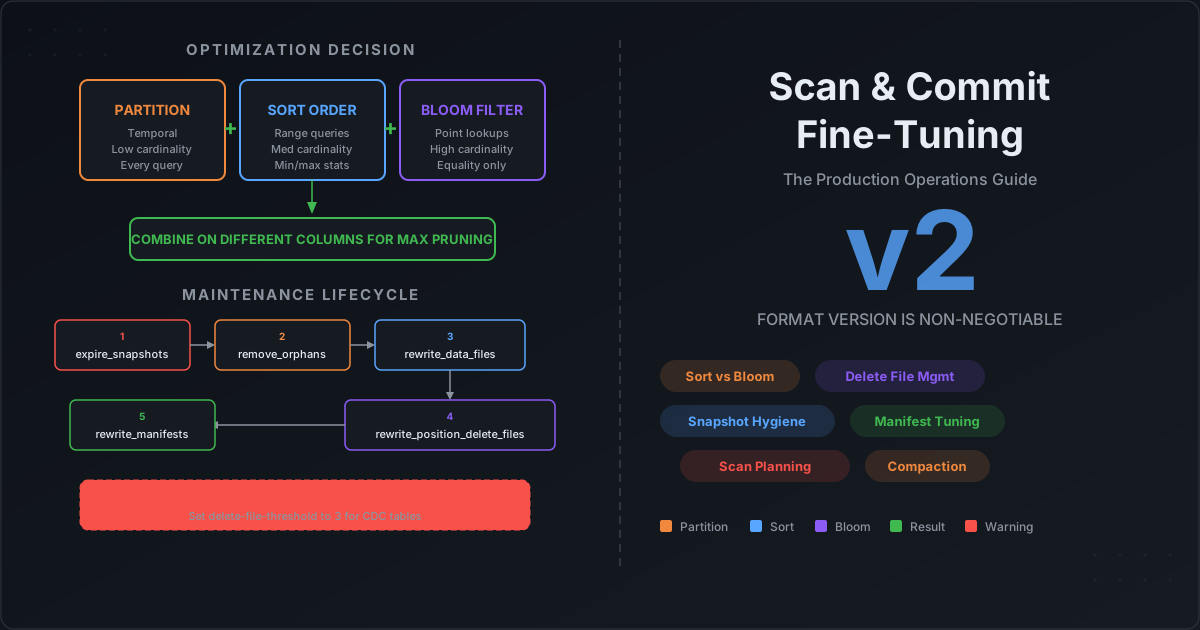
This post is the production operations guide. We cover the decision framework for partition vs sort vs bloom filter, explain exactly what happens during scan planning so you know where compute is wasted, walk through every maintenance procedure with recommended thresholds, explain why format version 2 is non-negotiable and what delete file neglect costs you, and give you the complete maintenance lifecycle in the right execution order.